
# Shopify vs WooCommerce: The Decision Is About Who Maintains It
Feature comparisons between Shopify and WooCommerce are close to useless, because both platforms will sell what you sell. Both handle variants, both take card payments, both have thousands of extensions, both can rank.
The decision is not about features. It is about who is going to maintain the store on a Tuesday in eighteen months, and what happens when something breaks. Answer that honestly and the platform picks itself.
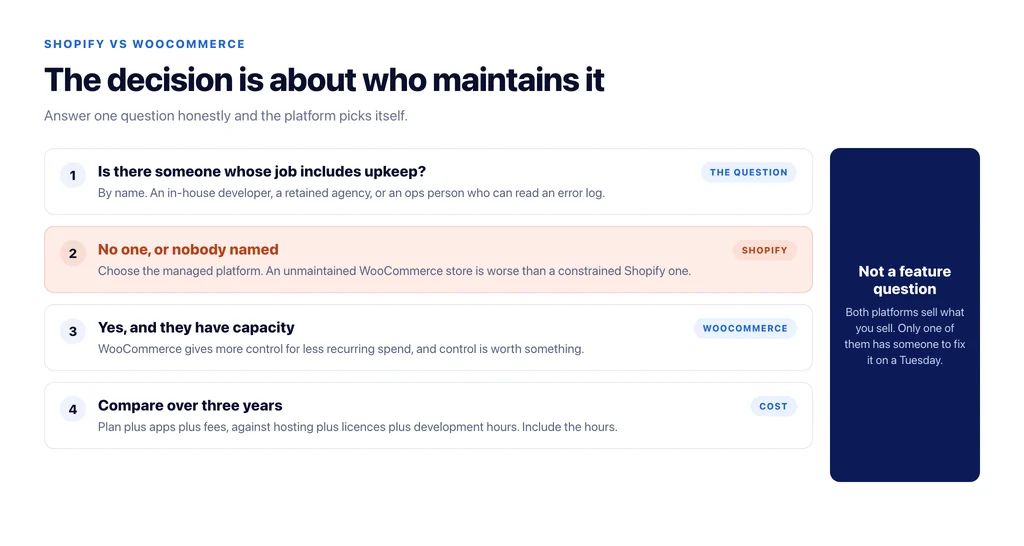
The one question that decides it
Does your business have, or will it pay for, someone whose job includes the store’s technical upkeep?
If yes — an in-house developer, a retained agency, an ops person who can read an error log — WooCommerce gives you more control for less recurring spend, and control is worth something.
If no, and the store will be run by a founder or a marketing person who has other work, Shopify is the correct answer even where WooCommerce is technically better. A managed platform trades flexibility for someone else carrying the maintenance burden, and an unmaintained WooCommerce store is a worse outcome than a constrained Shopify one.
Everything below is detail underneath that question.
What each platform actually is
Shopify is hosted software. You rent it monthly, the vendor handles servers, updates, PCI compliance and uptime, and you extend it with apps that also charge monthly. You do not get server access, and you cannot change platform behaviour that the vendor has not exposed.
WooCommerce is a plugin for WordPress that you host yourself. You own the code and the database, you choose the host, and you can change anything. You also own updates, backups, security, and the consequences of a plugin conflict at 11pm on Black Friday.
That is the whole trade. Everything else follows from it.
Cost, over three years rather than per month
Comparing a monthly subscription against “free software” is how stores get the cost wrong in both directions.
Shopify’s real cost is the plan plus apps plus transaction fees where a third-party gateway is used. Apps are the part that surprises people: subscriptions, reviews, bundles, advanced filtering and multi-currency each add a monthly line, and a mature store commonly runs a dozen. The bill grows with capability, not with revenue.
WooCommerce’s real cost is hosting that can handle the catalogue, annual licences for the handful of premium extensions actually needed, and development time. The licences are usually smaller than the equivalent apps. Development time is the variable that decides whether the platform was cheaper, and it is the line most spreadsheets omit.
A useful rule: WooCommerce is cheaper when you already have technical capacity, and more expensive when you have to buy that capacity by the hour at short notice.
SEO differences that are real
Most SEO differences between the platforms are exaggerated. A few are not.
URL structure. Shopify enforces path prefixes — products under `/products/`, categories under `/collections/`. You cannot flatten them, and a product is reachable through more than one path, which makes canonical handling something you check rather than assume. WooCommerce lets you define permalinks freely, including removing the product base entirely.
Template control. WooCommerce gives you the whole template layer, which matters when a fix has to happen at template level across nine hundred URLs. On Shopify you work within the theme architecture and what the platform exposes.
Structured data. Neither ships complete `Product` markup. WooCommerce’s default output omits `brand` and identifiers; Shopify themes vary. Either way this is a plugin or theme job, not a platform advantage.
Server-level work. Redirect maps, log analysis, bot access rules and response headers are straightforward when you have server access and awkward when you do not. This is the difference that shows up during a migration.
Speed. Neither platform is inherently faster. Shopify’s infrastructure gives a good floor with less effort; WooCommerce has a higher ceiling and a much lower floor if nobody is minding it. A well-hosted, cached WooCommerce store beats an app-heavy Shopify one, and an unmaintained WooCommerce store loses to everything.
Where each one actually hurts
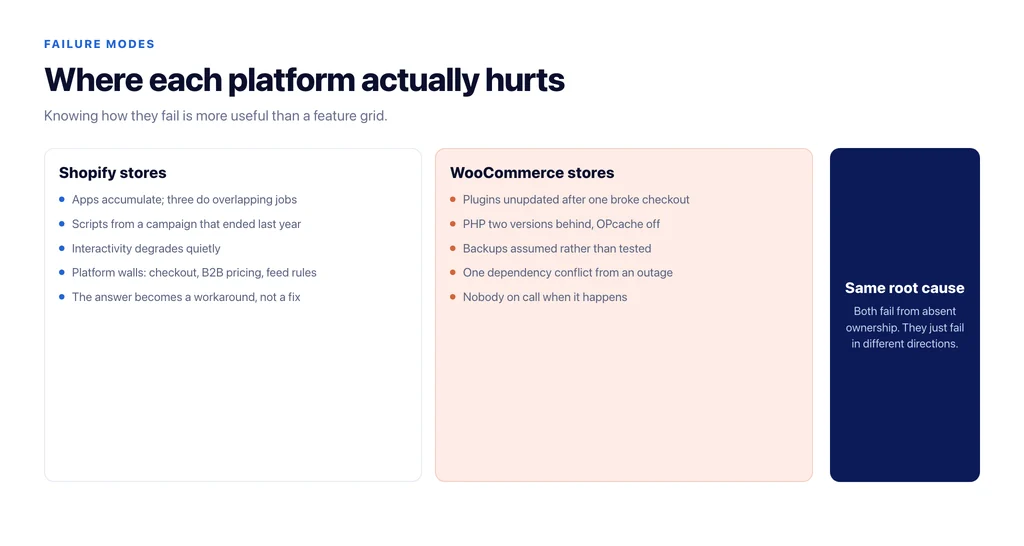
The failure modes are predictable, and knowing them is more useful than a feature grid.
Shopify stores get hurt by app accumulation. Every app injects scripts, three of them do overlapping jobs, nobody removes the one from the campaign that ended last year, and interactivity degrades. They also hit walls: a checkout requirement, a B2B pricing rule, or a feed transformation the platform will not allow, and the answer is a workaround rather than a fix.
WooCommerce stores get hurt by absent ownership. Plugins go unupdated because an update once broke checkout, PHP stays two versions behind, backups are assumed rather than tested, and the site is one dependency conflict away from an outage nobody is on call for. The technical ceiling is irrelevant if no one is in the room.
When it is worth moving
Rarely, and not for the reasons usually given. Replatforming costs a quarter of somebody’s attention and carries real ranking risk, so it needs a reason bigger than preference.
Good reasons: the platform structurally cannot do something the business now needs; recurring app and transaction costs have overtaken what maintenance would cost; the store has outgrown a theme built for a hundred products and is carrying a thousand.
Bad reasons: an agency prefers the other stack, or the current store is slow. A slow store is usually a slow store on any platform, and migrating carries the ranking risk on top.
If you do move, the redirect map is the whole job — every old URL to its closest live equivalent, no chains, no mass redirects to the homepage. We covered how that goes wrong in ecommerce replatforming without losing your rankings.
A short decision test
Answer these and the platform is decided:
- Who fixes the store when it breaks, by name? If nobody, choose Shopify.
- Is there a requirement the platform must not constrain — checkout, pricing logic, integration, data ownership? If yes, choose WooCommerce.
- Do the monthly app subscriptions you would need exceed what a retained developer costs? If yes, WooCommerce.
- Is the catalogue going to change shape — new attributes, variants, market-specific pricing? If yes, weight template control higher.
- Is anyone paid to keep dependencies current? If not, choose the managed option regardless of anything above.
Whichever you pick, the architecture decisions that determine whether the store ranks — how categories map to demand, how facets are controlled, how internal links flow — are platform-independent. Those are structural choices you make on either stack, and getting them right matters far more than the logo on the admin panel.
Sources
- Customize permalinks — WordPress
- Managing products — WooCommerce
- Theme templates — Shopify
- Site moves with URL changes — Google Search Central
- Canonicalization — Google Search Central
Frequently Asked Questions
Want this run against your store? Book a call with The Reach Bureau.