# Shopify to WooCommerce Migration: The SEO Runbook
Rankings survive a migration when the URL work is done properly and fail when it is not. Everything else — theme, plugins, data import — is a build problem. This is the SEO half, in the order it has to happen.
Assume the decision is already made. If it is not, start with should I move from Shopify to WooCommerce.
Before anything: capture the current state
You cannot prove a migration went well without a baseline, and you cannot rebuild one afterwards.
Export, dated and stored outside both platforms: every indexable URL with its organic traffic and revenue for the last twelve months; every ranking keyword with its landing page; the full crawl of the live site; and the current sitemap. Screenshot or export Search Console performance for the same window.
The crawl is the important one. It is the definitive list of what exists, and it will differ from the sitemap and from what the platform’s export claims.
Build the URL map, one row per URL
This is the job. A migration with a complete map is boring; a migration without one is an incident.
Shopify enforces path prefixes — products under `/products/`, collections under `/collections/`, blog posts under `/blogs/` — and WooCommerce does not have to keep them. Decide the destination structure once, then map every URL to its single closest live equivalent.
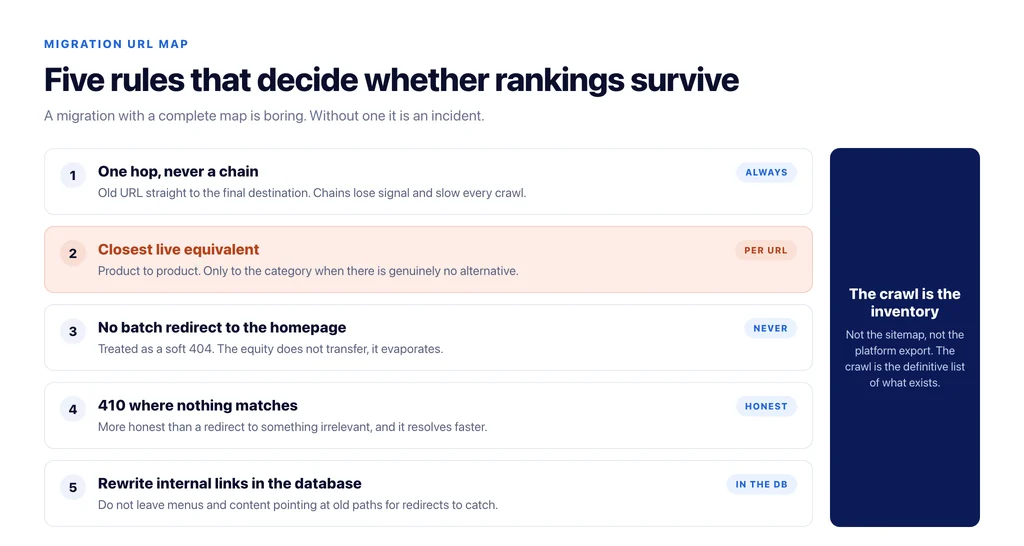
Rules that prevent most damage: one redirect, never a chain; never point a batch of products at the homepage or a category as a shortcut; retired products go to the closest live alternative, and only to the category when there is genuinely no alternative; keep query-parameter behaviour in mind, because Shopify variant and collection filter URLs exist in the index whether you intended them or not.
Where a page has no equivalent at all, a 410 is more honest than a redirect to something irrelevant, and it resolves faster.
Preserve what the old platform did for you
Three things are easy to lose in the rebuild.
Canonical behaviour: Shopify products are reachable through collection paths, and the canonicals handle it. Confirm the new site’s canonicals are self-referencing and that no template writes the old domain.
Structured data: theme-generated `Product` and `BreadcrumbList` markup disappears with the theme. Rebuild it, and remember WooCommerce omits `brand` and identifiers by default.
Internal links: hard-coded links in content and menus will point at old paths after launch. Rewrite them in the database rather than relying on redirects, because a site that redirects internally on every click is slow and looks broken to a crawler.
Keep staging out of the index
Every migration has a staging site, and a share of them get indexed. Password-protect it at the server level rather than relying on `robots.txt` or a `noindex`, and check before launch that the staging host is not in the index. If it is, remove it before the new site goes live, or the two will compete.
Launch sequence
In order, on a quiet day, not before a peak:
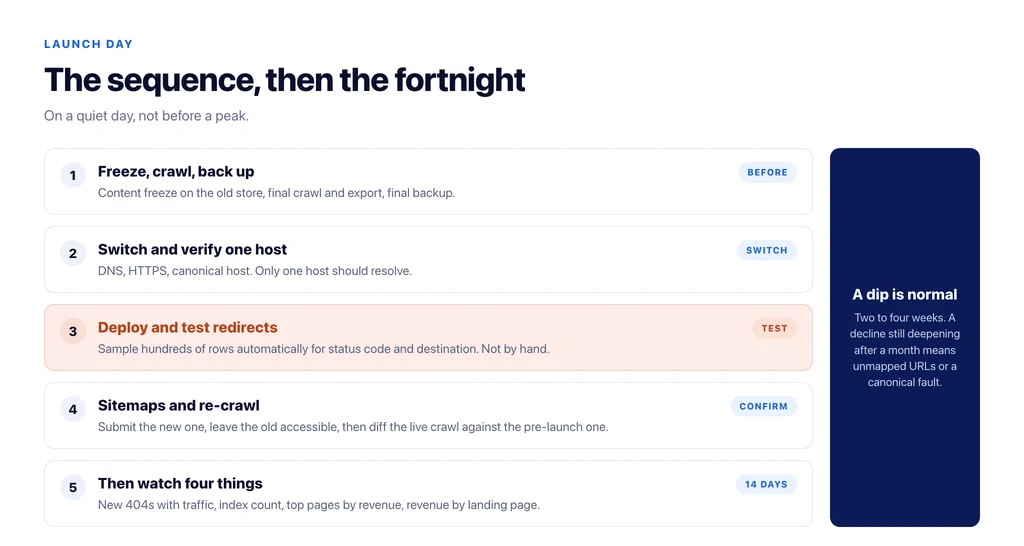
- Freeze content changes on the old store.
- Final crawl, final export, final backup.
- Switch DNS, confirm HTTPS and the canonical host, and that only one host resolves.
- Deploy redirects and test a sample of at least a few hundred rows for status code and destination — automated, not by hand.
- Submit the new sitemap; leave the old one accessible until it stops being requested.
- Re-crawl the live site and compare against the pre-launch crawl.
- Check `robots.txt`, canonicals, structured data and analytics on the live domain, in that order.
The first fortnight
Watch four things daily, then weekly.
Crawl errors and 404s in Search Console — new 404s with traffic are unmapped URLs, and they will appear no matter how careful the map was.
Indexed page count, which should fall then recover as the old URLs drop and the new ones enter.
Rankings for the top fifty pages by revenue, not the top fifty by volume.
Revenue by landing page against the baseline you exported, which is the only measure that answers the question everybody is asking.
Expect a dip. A two to four week wobble is normal while URLs are reprocessed; what is not normal is a decline that deepens after a month, which usually means unmapped URLs or a canonical fault.
What to tell the business before you start
Three expectations, set in advance, prevent the migration being judged as a failure while it is still working.
There will be a dip. Two to four weeks of unstable rankings and revenue is normal, not a sign of a mistake. Saying so beforehand is the difference between a fortnight of iteration and a fortnight of emergency meetings.
Some URLs will be missed. Even a careful map misses a handful, because the index contains URLs that no crawl or export knows about — old campaign paths, parameter combinations, pages linked from someone else’s site. The plan is to catch them in Search Console in week one and map them then.
Revenue by landing page is the measure, not total traffic. Traffic can fall while revenue holds if what was lost was thin informational visits. Agreeing the measure in advance stops the project being assessed on the metric that moves most easily.
Put those three lines in writing before the launch date is set. They are the cheapest risk management in the project.
The checklist
- Baseline exported and stored outside both platforms.
- Full crawl taken as the definitive URL inventory.
- One-row-per-URL map, single-hop redirects, no batch redirects to the homepage.
- 410 where nothing equivalent exists.
- Self-referencing canonicals; no template writing the old domain.
- Structured data rebuilt, including the fields WooCommerce omits.
- Internal links rewritten in the database, not left to redirects.
- Staging password-protected at server level and confirmed out of the index.
- Redirect sample tested automatically for status and destination.
- Daily monitoring of 404s, index count, revenue by landing page for two weeks.
Sources
- Site moves with URL changes — Google Search Central
- Canonicalization — Google Search Central
- Customize permalinks — WordPress
- SEO best practices for ecommerce sites — Google Search Central
Frequently Asked Questions
Want this run against your store? Book a call with The Reach Bureau.