# Category Page Schema: What to Mark Up and What to Skip
Category pages attract more bad structured-data advice than any other template, mostly because people apply product-page thinking to a list of products. The correct set is small, and getting it wrong is worse than leaving it out.
What belongs on a category page
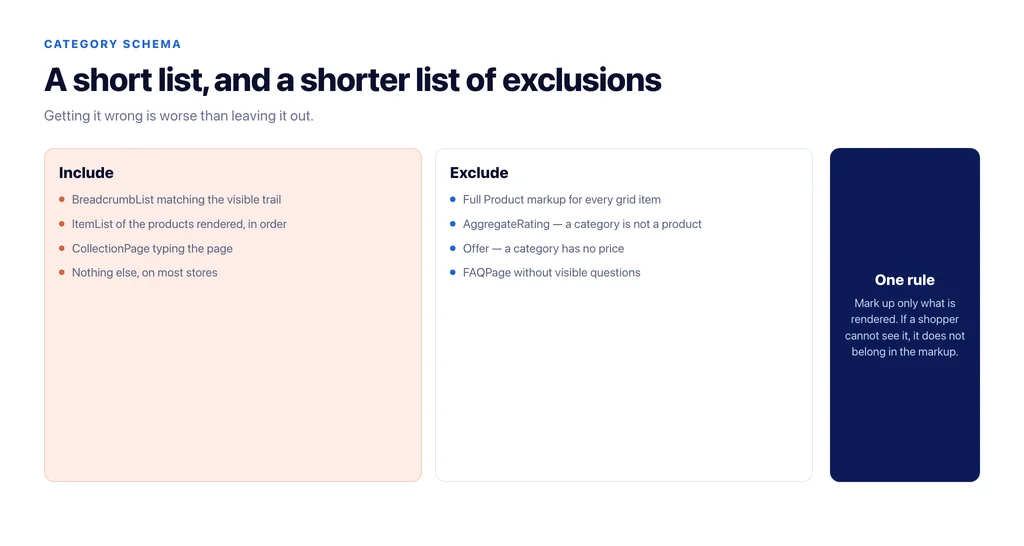
`BreadcrumbList`. The single most useful item. It communicates the path, it is eligible to appear in results, and it is unambiguous. Mark up the visible breadcrumb, matching it exactly — including the position of the current page.
`ItemList`. A list of the products shown, in the order shown, each entry pointing at the product URL. This is the honest description of what a category page is. Keep it to what is actually rendered: if the page shows twenty-four products, the list has twenty-four entries, not the whole category.
`CollectionPage`. Types the page itself. Useful as a container, harmless, and it gives the `ItemList` somewhere to live in the graph.
That is the set. On most stores, done properly, it is the whole job.
What does not belong
Full `Product` markup for every item in the grid. This is the common error. Product markup with price and availability belongs on the page where that product is the subject. Repeating it for two dozen products on a listing page invites mismatches — the price in the grid is often a range or a from-price — and the mismatch is the problem, not the absence.
`AggregateRating` on the category. There is nothing to rate. A category is not a product.
`FAQPage` on a category, unless there is a visible FAQ. If you have genuine questions and answers rendered on the page, mark them up. If not, do not manufacture them for the markup.
`Offer` at category level. A category does not have a price. A from-price in the copy is not an offer.
Pagination, where most implementations break
Category pages paginate, and the markup has to be consistent with the strategy rather than a copy of page one.
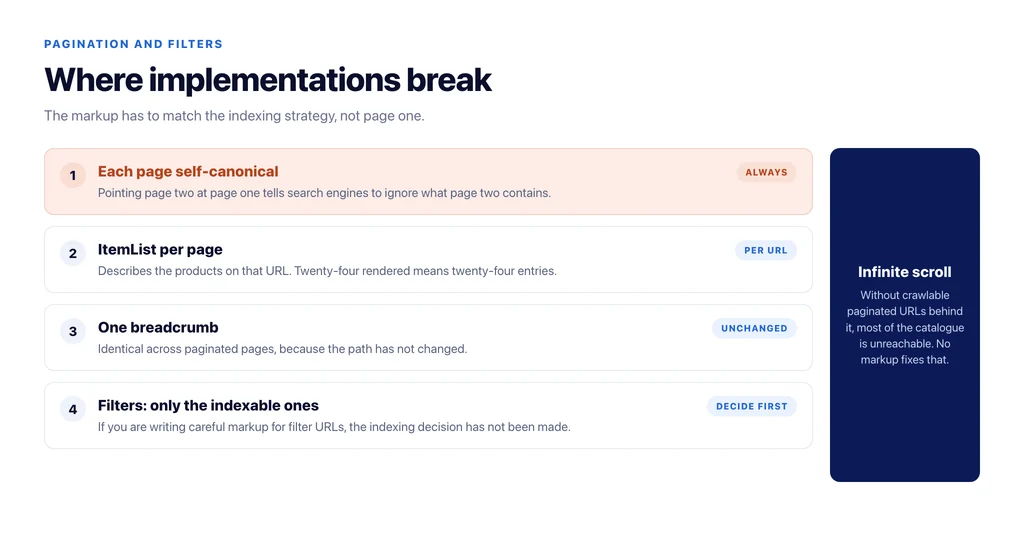
Each paginated URL should be self-canonical, not canonicalised to page one — page two contains different products, and pointing it at page one tells search engines to ignore what it contains. The `ItemList` on each page describes the products on that page. The breadcrumb is identical across pages, because the path has not changed.
If you use a view-all or infinite scroll, decide which URLs are the canonical set and make sure crawlable links exist to each of them. Infinite scroll with no paginated URLs behind it means most of the catalogue is unreachable, and no markup fixes that.
Faceted and filtered pages
Only the filter combinations you have decided to index should carry the full set. For those, the `ItemList` reflects the filtered results and the breadcrumb reflects the path a shopper took.
For the combinations you have closed to crawlers, the markup is irrelevant — they should not be fetched. If you find yourself writing careful structured data for filter URLs, that is a sign the indexing decision has not been made. The demand-based approach to that decision is in ecommerce category page best practices.
Rules that prevent the usual faults
Mark up only what is rendered. If a shopper cannot see it, it does not belong in the markup.
Keep it in one graph per page rather than several disconnected blocks, so relationships are explicit.
Generate it at template level, not per page in a page builder, so it cannot drift between categories.
Validate after every theme release. Structured data is generated by the theme and the SEO plugin together, and a release changes it silently.
Never mark up a price on a listing page unless a single unambiguous price is displayed for that item.
How to check what your store actually outputs
Structured data on WooCommerce is assembled by the theme and the SEO plugin together, which means what you get is rarely what either one documents.
Check three URLs rather than one: a top-level category, a paginated page two, and an indexable filtered page. For each, read the rendered JSON-LD and compare it against what the page displays — the number of items, the breadcrumb path, the canonical.
The faults that show up most often: an `ItemList` describing the full category rather than the rendered page, a breadcrumb built from the URL path rather than the category hierarchy so it disagrees with the visible trail, and product entries carrying a price copied from the grid’s from-price.
Do it after every release that touches templates or updates the SEO plugin, and keep the previous output so you can see what changed. Two dated files are a more useful debugging tool than any validator.
The checklist
- `BreadcrumbList` matching the visible breadcrumb exactly.
- `ItemList` limited to the products rendered on that URL, in order.
- `CollectionPage` typing the page.
- No `Product`, `Offer` or `AggregateRating` at category level.
- `FAQPage` only where questions are visibly rendered.
- Paginated URLs self-canonical, each with its own `ItemList`.
- Crawlable links to every canonical paginated URL.
- Markup on indexable filter pages only.
- Generated at template level and revalidated after each release.
Sources
- Carousel (ItemList) structured data — Google Search Central
- Breadcrumb structured data — Google Search Central
- Product structured data — Google Search Central
- Crawling and managing faceted navigation — Google Search Central
Frequently Asked Questions
Want this run against your store? Book a call with The Reach Bureau.