
# Core Web Vitals on WooCommerce: What to Change in the Stack
The metrics are platform-neutral; the causes are not. On a WooCommerce store the same handful of stack decisions produce most of the field data, and knowing which layer to work on saves weeks of front-end effort that changes nothing.
What the metrics measure and how to read field data is covered in core web vitals for ecommerce. This is the implementation layer beneath it.
Start at the server, because nothing above it can compensate
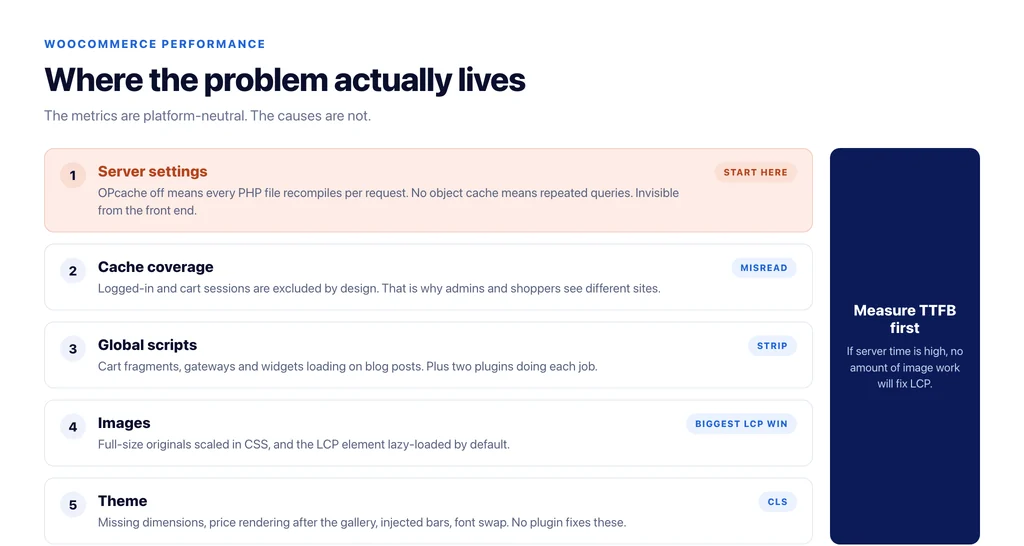
Three settings account for most slow time-to-first-byte on WooCommerce, and all three are invisible from the front end.
PHP OPcache. If it is off, every PHP file is compiled on every request. On a store loading a thousand-plus files per request, this dominates response time. It is a one-line configuration change and it is off on a surprising number of managed hosts.
Object caching. Without persistent object cache, WooCommerce repeats the same database queries on every page load. Redis or Memcached, correctly configured, changes response time more than any front-end optimisation available.
PHP version. Running two versions behind is both a performance cost and a security one, and themes built on modern frameworks may require a specific version — check what the theme expects before upgrading blindly.
Measure TTFB before and after. If it is still high, no amount of image work will fix LCP.
Understand what your page cache is not caching
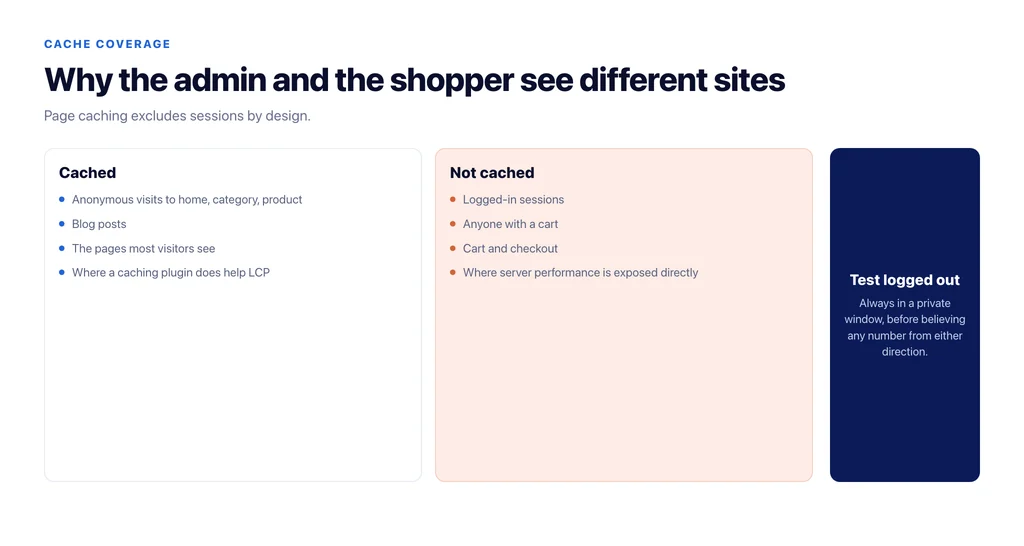
Page caching is the largest single win and the most commonly misread, because caching plugins exclude sessions by design.
Logged-in users, users with a cart, and anything past the cart are typically served uncached. That produces the classic split where an administrator sees seven seconds and a visitor sees half a second — or the reverse, where a problem visitors have is invisible to the team.
Two consequences. Always test in a private window before believing a number. And accept that cart and checkout are dynamic pages: their performance work is server-side, not cache-side, which is exactly where a store with poor OPcache and no object cache suffers most.
Cut what runs on every page
WooCommerce and its extensions load scripts and styles globally by default, including on pages that have nothing to do with commerce.
The audit is mechanical: list what loads on a blog post, and remove anything that is not needed there — cart fragments, payment gateway scripts, review widgets, slider libraries. Cart fragments in particular run on every page load in many configurations and are a recurring cause of poor interactivity.
Then count plugins doing overlapping jobs. Two analytics integrations, two schema generators, two caching layers. Each one costs main-thread time and one of each is enough.
Images, where the biggest LCP win usually is
Three specifics rather than general advice.
Regenerate thumbnails so the served size matches the rendered size — a catalogue migrated from another platform frequently serves full-size originals scaled down in CSS.
Serve WebP, and make sure the fallback logic is not shipping both formats.
Exclude the LCP element from lazy loading. On a product page that is the main product image; on a category page it is the first row of thumbnails. Most optimisation plugins lazy-load everything by default, which delays the one image the metric is measured on.
Then layout stability, which is mostly the theme
CLS on WooCommerce comes from a short list: images without dimensions, the price or stock notice rendering after the gallery, a cookie or promo bar injected above content, and web fonts swapping.
All four are theme-level fixes: explicit dimensions, reserved space for anything that appears after paint, and preloading the fonts actually used. None of them requires a plugin, and no plugin will fix them properly.
The measurements worth keeping
Performance work on WooCommerce gets redone because nobody records what the stack looked like when a number changed.
Keep four figures per template — home, category, product, checkout — dated: time to first byte logged out, LCP from field data, the number of requests, and the page weight. Then a note of what was changed and when.
Two things become obvious from six months of that record. Which plugin release cost you response time, because the number moves on the day it was installed. And which optimisation actually mattered on your stack, as opposed to the ones that appear in every article.
The alternative is what most stores have: a performance project every eighteen months that rediscovers the same three findings, because the last one was never written down.
What to do in what order
- Verify OPcache is on and PHP is current for the theme.
- Add persistent object caching and measure TTFB again.
- Confirm what page caching covers, and test logged out.
- Strip global scripts and styles from pages that do not need them.
- Remove duplicate-purpose plugins.
- Regenerate images to rendered sizes, serve WebP, exclude the LCP element from lazy loading.
- Fix layout shift at theme level: dimensions, reserved space, font preloads.
- Re-measure field data after four weeks, not the next morning.
Sources
- Largest Contentful Paint (LCP) — web.dev
- Interaction to Next Paint (INP) — web.dev
- Cumulative Layout Shift (CLS) — web.dev
- Chrome UX Report — Chrome for Developers
- Configuring WooCommerce settings — WooCommerce
Frequently Asked Questions
Want this run against your store? Book a call with The Reach Bureau.