
# Core Web Vitals for Ecommerce: Which Fixes Change Revenue
Core Web Vitals are three numbers, and on an ecommerce site each one usually has a single dominant cause. That is the useful part. Most stores do not need a performance programme; they need to find which of about six things is producing the number, fix that, and stop.
What follows is what the three metrics measure in store terms, what typically causes each on a WooCommerce catalogue, and which fixes are worth doing before the ones that only move a lab score.
What the three metrics actually measure
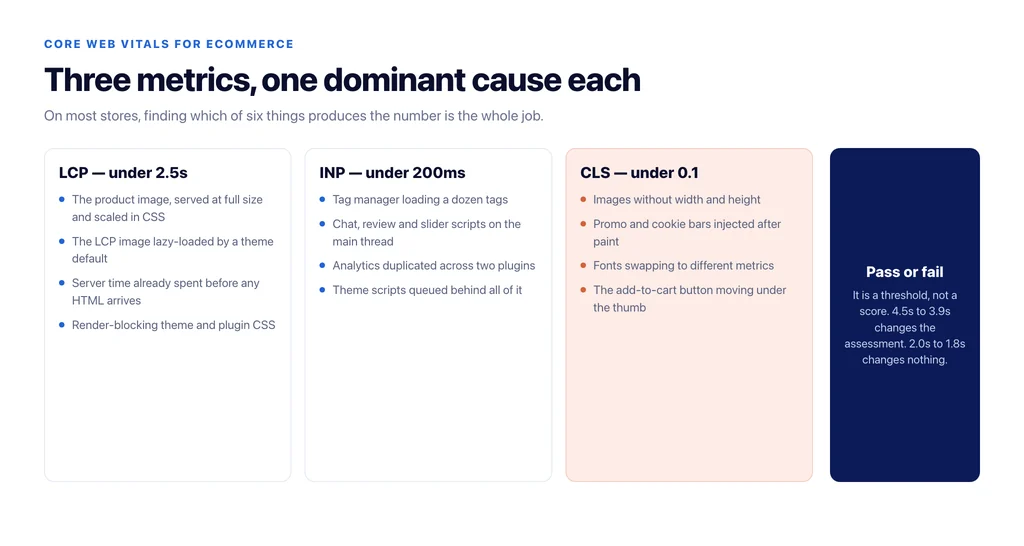
LCP — Largest Contentful Paint. How long until the biggest thing in the viewport is painted. On a product page that is almost always the main product image. On a category page it is the first row of product thumbnails. On the homepage it is the hero.
INP — Interaction to Next Paint. How long the page takes to respond after a shopper taps something. Adding to cart, opening a filter, changing a variant. This replaced the old input-delay metric and is stricter, because it measures the whole interaction, not just the wait before processing starts.
CLS — Cumulative Layout Shift. How much the layout jumps while loading. On stores this is the metric that quietly costs money, because the thing that moves is often the add-to-cart button.
None of the three measures “how fast the site feels” in general. They measure three specific failures, which is why a generic speed project so often changes the score and not the outcome.
Field data decides, lab data explains
There are two kinds of measurement and mixing them up is the most common reason performance work goes nowhere.
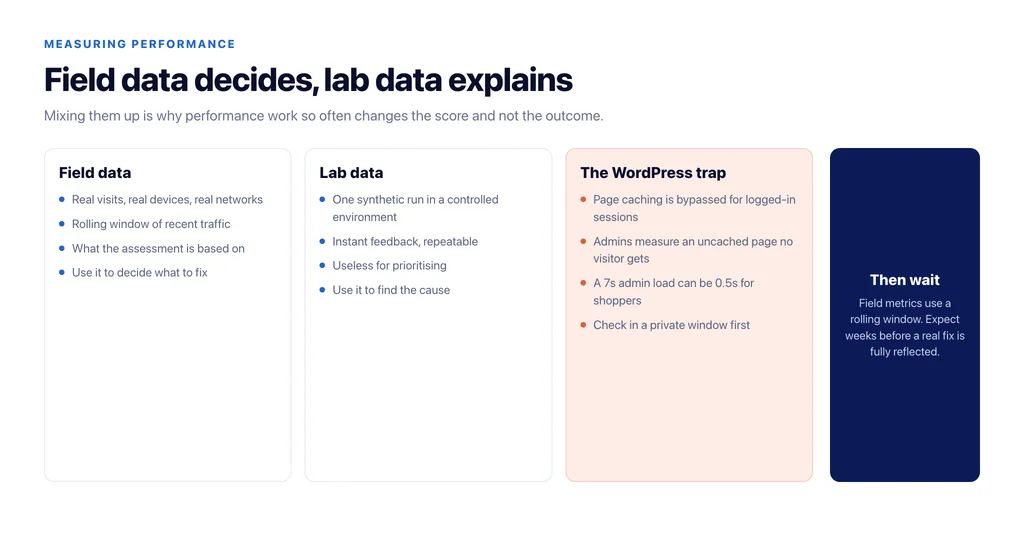
Field data is what real visitors experienced, aggregated over the last month, on their devices and their networks. It is what the metrics are assessed on. Lab data is a synthetic run in a controlled environment, and it is a debugging tool.
Prioritise from field data. Then use lab tools to find the cause. Doing it the other way round produces an afternoon of work that improves a Lighthouse number no shopper ever generated.
One trap specific to WordPress stores: page caching is usually bypassed for logged-in sessions. An administrator testing the site is served an uncached page, sees several seconds of load time, and escalates a problem that visitors do not have — or the reverse, a visitor-facing problem stays invisible because the person checking has a warmed cache. Check in a private window first. We went through how to measure this without fooling yourself in how site speed influences ecommerce SEO and conversions.
What actually makes LCP slow on a store
In order of how often it is the real cause:
Product images served at full size. A 2,400px JPEG scaled down in CSS to 600px still downloads in full. Serving correctly sized WebP for the rendered dimensions is usually the single largest LCP improvement available on a catalogue, and it costs nothing but a bulk regeneration.
The LCP image lazy-loaded. Lazy loading everything is a default in many themes and plugins. Lazy loading the one image that defines LCP delays it by design. The hero and the main product image must load eagerly; everything below the fold should not.
Server response time. If time to first byte is already several hundred milliseconds, no front-end work will fix LCP. On shared hosting the usual causes are a missing object cache, PHP OPcache disabled, and a plugin running database queries on every request. OPcache being off is worth checking explicitly — it means every PHP file is recompiled per request, and it is invisible from the front end.
Render-blocking CSS. Theme and plugin stylesheets loaded in the head, all of them, on every template, including the checkout styles on a blog post.
Web fonts. A font loaded from a third-party host, with no fallback, blocking text paint.
What breaks INP
Interactivity problems on stores are almost always third-party JavaScript competing with the theme’s own scripts on the main thread. The recurring offenders are tag managers loading a dozen tags, chat widgets, review widgets, sliders, and analytics duplicated across two plugins.
The diagnostic is straightforward. Load a product page with third-party scripts blocked, tap add-to-cart, and compare. If interaction becomes instant, the problem is not your theme.
The fix is rarely code. It is deciding which of those scripts earns its place, loading the survivors after interaction where possible, and refusing to add the next one without checking. A store with four analytics tools has a measurement problem and a performance problem, and removing three fixes both.
What causes CLS, and why it costs conversions
Layout shift on a store comes from four things: images without width and height attributes, ads or banners injected after paint, fonts swapping to a different metric, and content loaded by JavaScript above existing content — a cookie bar, a promo bar, a stock notice.
The reason to care goes beyond the metric. When a shopper reaches for add-to-cart and a shipping banner pushes the button down, they tap the wrong thing. That is not a ranking issue; it is a checkout issue that shows up as a conversion problem nobody can explain. If your pages rank and do not convert, layout stability belongs on the list of causes — see why ecommerce pages rank but don’t convert.
Set explicit dimensions on every image, reserve space for anything injected, and preload the fonts you actually use.
What Core Web Vitals will and will not do for rankings
Being honest about this saves arguments. Core Web Vitals are a real but small ranking input. They do not outrank relevance. A fast page that does not answer the query will not beat a slower page that does.
What they reliably affect is what happens after the click: bounce, add-to-cart rate, and completed checkouts. That is the case worth making internally. Treat performance as a conversion project with a modest SEO benefit, and it gets funded and finished. Treat it as an SEO project, and it stalls the moment rankings do not move in a fortnight.
There is also a threshold effect worth knowing: the assessment is pass or fail against a target, not a linear score. Moving LCP from 4.5s to 3.9s changes the assessment. Moving it from 2.0s to 1.8s changes nothing but the number.
The order to fix things in
- Confirm what field data says, per template — homepage, category, product, checkout. Templates fail differently.
- Check server response time. If TTFB is the problem, stop optimising images.
- Fix image dimensions and formats, and stop lazy-loading the LCP element.
- Audit third-party scripts and remove what nobody reads.
- Reserve space for everything that appears after paint.
- Re-measure in the field after four weeks, not the next morning. The data is a rolling window.
Six steps, and on most stores the first three account for nearly all of the improvement.
Sources
- Largest Contentful Paint (LCP) — web.dev
- Interaction to Next Paint (INP) — web.dev
- Cumulative Layout Shift (CLS) — web.dev
- Chrome UX Report — Chrome for Developers
- Page experience in Google Search results — Google Search Central
Frequently Asked Questions
Want this run against your store? Book a call with The Reach Bureau.