# How to Optimize Product Pages for SEO When Variants Multiply
Product page advice usually assumes one product, one page. Real catalogues do not work that way. One t-shirt is nine colours and five sizes, one desk is three finishes and two depths, and the decision about how those become URLs affects rankings more than anything you write on the page.
Get that structure wrong and the same product competes with itself forty-five times. Get it right and each page has a query to win.
The only question that decides the structure
Does the variant have its own demand?
If people search for the variant by name — “oak standing desk”, “black leather office chair” — it deserves its own indexable page with its own title, its own description, and its own image. If they do not — “medium”, “size 9”, “matte finish” — it does not, and giving it a URL creates competition without creating opportunity.
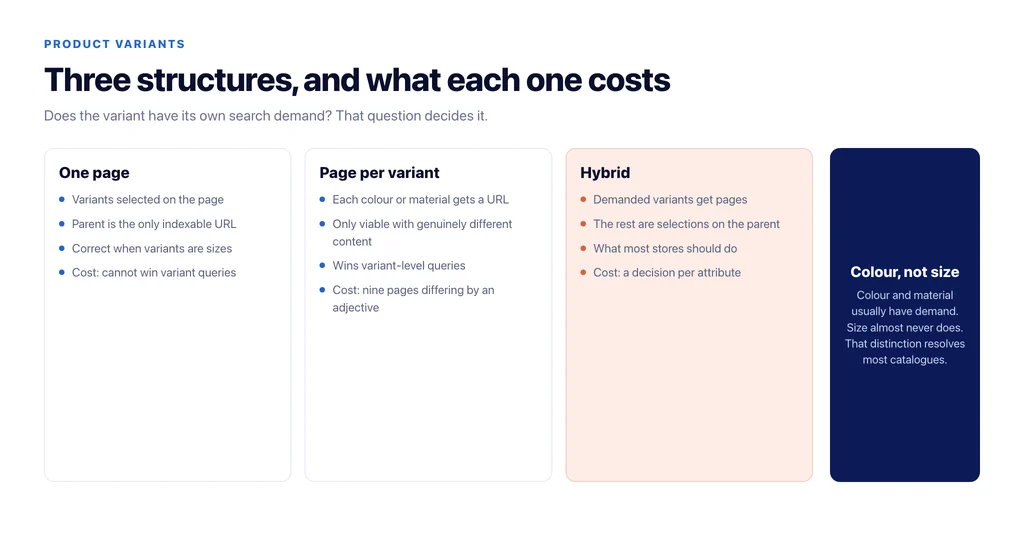
Colour and material usually have demand. Size almost never does. That single distinction resolves most catalogues.
Three valid structures, and what each costs
One page, variants selected on the page. The parent URL is the only indexable one; choosing a colour updates the gallery and price without changing the URL, or changes it to a parameter that is canonicalised to the parent. Simplest, safest, and correct for catalogues where variants are sizes and minor finishes. The cost: you cannot rank for variant-level queries.
Separate pages per variant, each with unique content. Each colour gets a URL, a distinct title, unique copy, its own images. This wins variant queries, and it is only viable if the content really differs. Nine pages differing by one adjective is the worst of both worlds.
Hybrid. The demanded variants get their own pages, the rest are selections on the parent. This is what most stores should do, and almost none do, because it requires a per-attribute decision rather than a platform-wide setting.
Make the canonical say what you decided
Whatever you choose, the canonical tags have to agree with it. Two failure modes are common on stores.
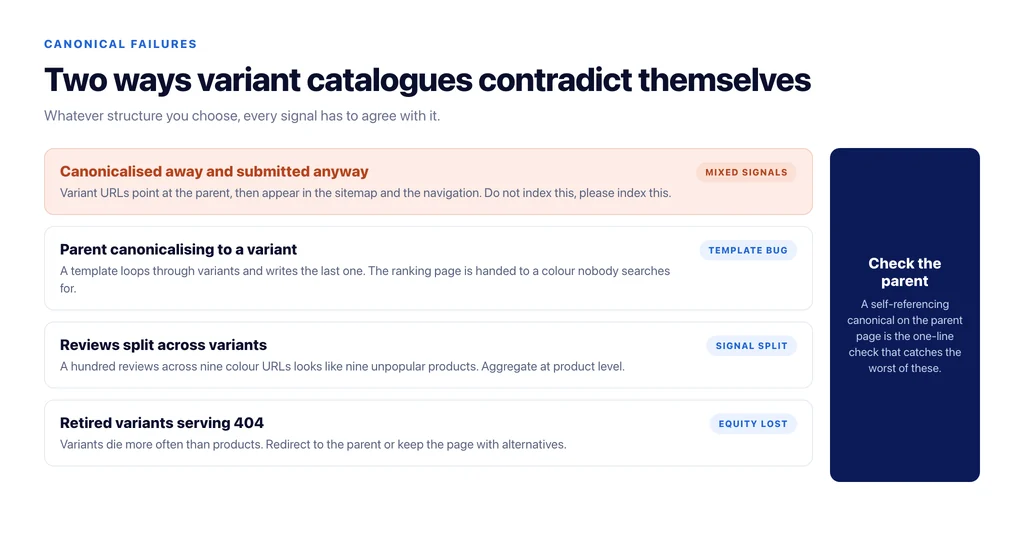
Variant URLs canonicalising to the parent while also being submitted in the sitemap and linked in navigation sends contradictory signals: do not index this, please index this. Pick one.
Parent pages canonicalising to a variant, usually because a template loops through variants and writes the last one, quietly hands the ranking page to a colour nobody searches for.
Give the page something the manufacturer’s feed does not have
Once structure is settled, the content question on a product page is narrow: what does a shopper still not know?
Manufacturer copy answers none of the useful questions. Fit relative to other brands. What it is like after six months. What is in the box. Which of the two similar models to buy. Whether it fits the thing they already own. Your support inbox contains all of this, and it is the only content on a product page that is genuinely unavailable elsewhere.
That is also what makes a page quotable by AI answers, for the same reason: specific, checkable claims survive summarisation, marketing adjectives do not.
Reviews, but attached to the right page
Reviews are variant-level in reality and product-level in usefulness. A hundred reviews split across nine colour URLs looks like nine unpopular products. Aggregate them at the product level and show them on every variant.
Structured data has to match: the rating in the markup must be the rating rendered on that page, or the markup becomes a liability rather than an asset.
Handle discontinued variants deliberately
Variants die more often than products. When a colour goes, the options are keep the page with a clear out-of-stock state and alternatives, or redirect it to the parent. Deleting it and serving a 404 wastes whatever equity it had, and on a large catalogue that happens hundreds of times a year without anyone noticing.
If the product itself is retired, redirect to the closest live equivalent, not the homepage. We covered how those decisions compound in ecommerce replatforming without losing your rankings.
Feeds and shopping surfaces change the calculation
Structure decisions look different once a product feed is involved, because the feed and the page have to agree.
Google’s shopping surfaces treat variants as distinct offers with their own identifiers. If your feed submits nine colour variants and your site exposes one URL, every variant in the feed lands on the same page, and the shopper has to re-select what they already chose in the result. That is a conversion cost, not a ranking one, and it is the strongest practical argument for giving demanded variants their own URLs.
The reverse mismatch is worse: variant URLs in the feed that are canonicalised away on the site, or a feed price that no longer matches the page. Price and availability disagreement between feed and page is one of the quietest causes of items dropping out of shopping results, and nothing in your SEO reporting will show it.
On WooCommerce this usually means filling `brand` and a real identifier at the variation level rather than the parent, because the defaults omit both.
What to check on every product template
- Which attributes have their own search demand? Decide per attribute, not per platform.
- Do variant URLs exist only where that demand does?
- Does the canonical agree with the sitemap and the internal links?
- Does the parent page canonicalise to itself?
- Is there content on the page that the manufacturer’s description does not contain?
- Are reviews aggregated at product level and shown on every variant?
- Does `Product` markup match the visible price, availability and rating?
- Do retired variants redirect rather than 404?
The structure decisions are the ones that move rankings. The copy decisions are the ones that convert the traffic once the structure lets it arrive.
Sources
- Product variant structured data — Google Search Central
- Consolidate duplicate URLs — Google Search Central
- Product structured data — Google Search Central
- Managing products — WooCommerce
Frequently Asked Questions
Want this run against your store? Book a call with The Reach Bureau.