
# Google Ads for Ecommerce: What to Run and In What Order
A store opening a Google Ads account faces half a dozen campaign types, a bidding menu, and a lot of advice written for lead generation. The order below is what works for a catalogue, and the reason each step comes where it does.
Nothing in it starts with campaign types, because the two most expensive mistakes happen before the first campaign goes live.
Before anything: make the measurement true
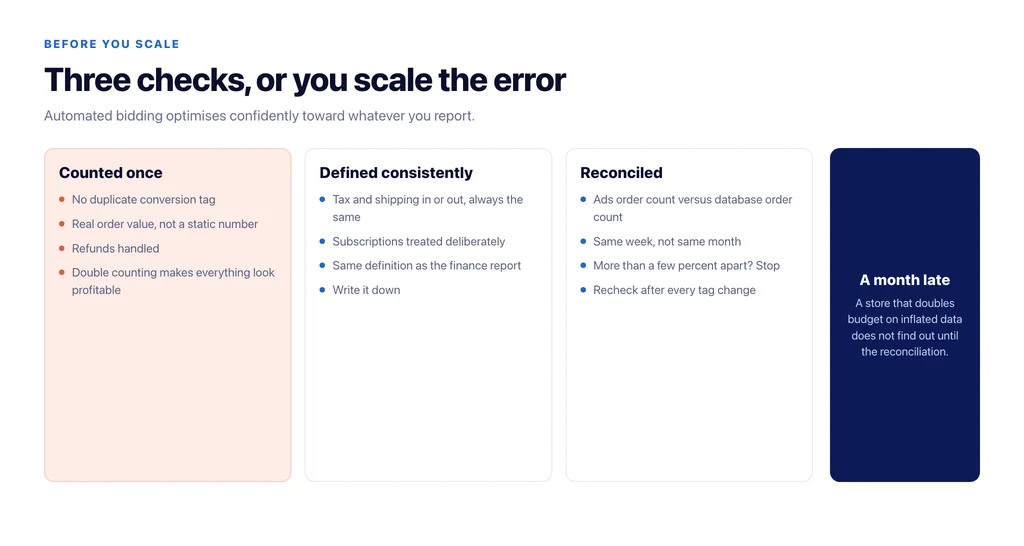
If conversion tracking is wrong, every decision after it is wrong in the same direction, and automated bidding will optimise confidently toward the error.
Three things to verify. Purchases recorded once, with the real order value rather than a static number — double-counted conversions make everything look profitable. Conversion values excluding tax and shipping if that is how you judge margin, consistently. And the order count in the ads interface reconciled against the order count in the store database for the same week.
Reconcile before you scale. A store that doubles budget on inflated conversion data does not find out for a month.
Then: know which products you want to sell
Paid amplifies whatever you point it at, including the products you should not be selling. Before spending, split the catalogue by contribution: what makes money at volume, what makes money rarely, what loses money after returns.
Returns are the part usually left out, and in apparel they can invert the ranking entirely. A line with a strong conversion rate and a high return rate can be your least profitable spend.
First campaign: branded search, reluctantly
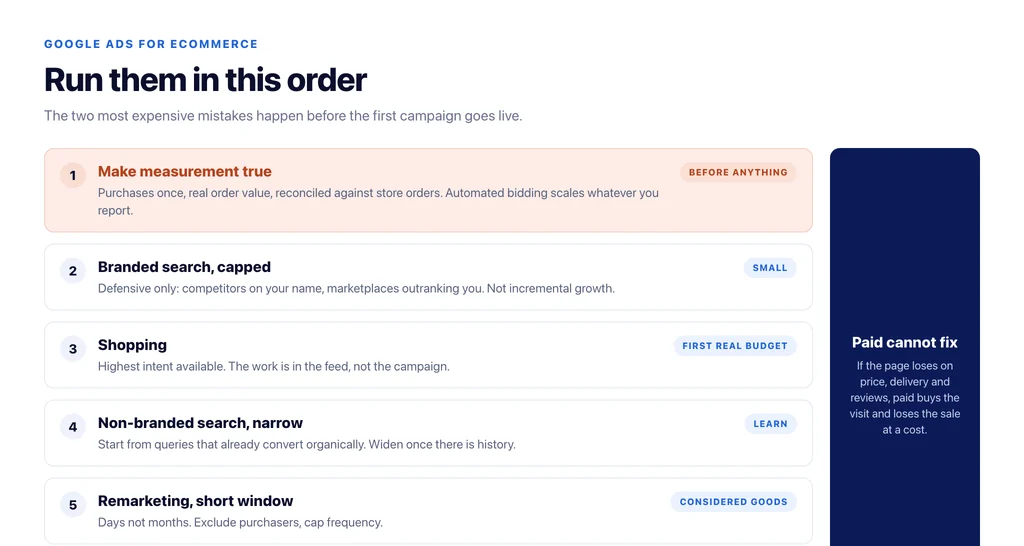
People searching your brand name were going to arrive anyway, which makes this the least incremental spend in the account and often the first thing recommended.
Run it, small, for two defensive reasons: competitors bidding on your name, and marketplaces outranking your own store for your own products. Keep the budget capped and do not count its return as incremental growth, because it is mostly not.
Second: Shopping, because the intent is highest
Shopping campaigns put your product in front of someone already searching for that product. For most catalogues this is the highest-intent inventory available and the right place for the first real budget.
The work here is in the product data rather than the campaign, which is why it has its own piece — see google shopping ads for ecommerce.
Third: non-branded search on the queries that convert
Generic search is expensive and it is where most accounts leak. Two rules keep it sane.
Start from what already converts organically. Search Console will tell you which non-branded queries produce revenue, and those are the ones worth paying for while you learn.
Keep it narrow at first. Broad match with automated bidding on a new account is how a budget disappears into queries with no purchase intent. Widen deliberately, once the account has conversion history to learn from.
Fourth: remarketing, on a short window
For considered purchases, remarketing does real work: the shopper genuinely intended to come back. Keep the window short — days, not months — exclude recent purchasers, and cap frequency, because the same creative for six weeks reads as desperation.
Fifth, and only with data: automated and blended campaign types
Automated campaign types perform in proportion to the conversion history you feed them. On a new account with thin data they spend efficiently against the wrong signal, and the reporting makes it difficult to see where.
Two guardrails when you get there: exclude branded traffic so its cheap conversions do not flatter the results, and hold a portion of budget in campaigns you control so you retain a comparison. Without a control you cannot tell whether the automation is finding demand or claiming credit for it.
What paid cannot fix
If your product page loses on price, delivery and reviews against the same product elsewhere, paid buys the visit and loses the sale at a cost. If the checkout leaks, paid pays for the leak.
Fix the funnel first, or at least know its numbers, so you can tell an ads problem from a store problem. The stage-by-stage arithmetic is in the ecommerce conversion rate calculator.
The reports to look at, and the ones to ignore
Most ecommerce ad accounts are reviewed through the wrong lens, which is why they get optimised into a comfortable plateau.
Worth reading weekly: search terms, so you can see what you actually bought; product-level spend against contribution, so you can see which lines the budget went to; and disapprovals, because a silently rejected feed removes inventory without any warning in the campaign view.
Worth reading monthly: contribution after ad spend, blended new-customer acquisition cost, and the incremental result of the last change you made.
Worth ignoring: impression share as a target, because buying more impressions in a segment that does not convert is a cost dressed as an opportunity; and any single-day movement, which is noise in almost every catalogue.
The discipline that matters is not looking at more numbers. It is looking at the same short list often enough to notice a change and having recorded what you altered.
The checklist
- Purchase tracking reconciled against store orders for the same week.
- Conversion values consistent about tax and shipping.
- Catalogue split by contribution, with returns included.
- Branded search capped, and not counted as growth.
- Shopping funded once the feed is complete.
- Non-branded search started from queries that already convert organically.
- Remarketing on a short window, purchasers excluded, frequency capped.
- Automated campaign types only with conversion history, branded excluded, a control retained.
- Checkout metrics known well enough to separate an ads problem from a store problem.
Sources
- What makes up a Shopping ad — Google Ads Help
- About Maximize conversion value bidding — Google Ads Help
- Measure ecommerce (GA4) — Google for Developers
- Product data specification — Google Merchant Center Help
Frequently Asked Questions
Want this run against your store? Book a call with The Reach Bureau.