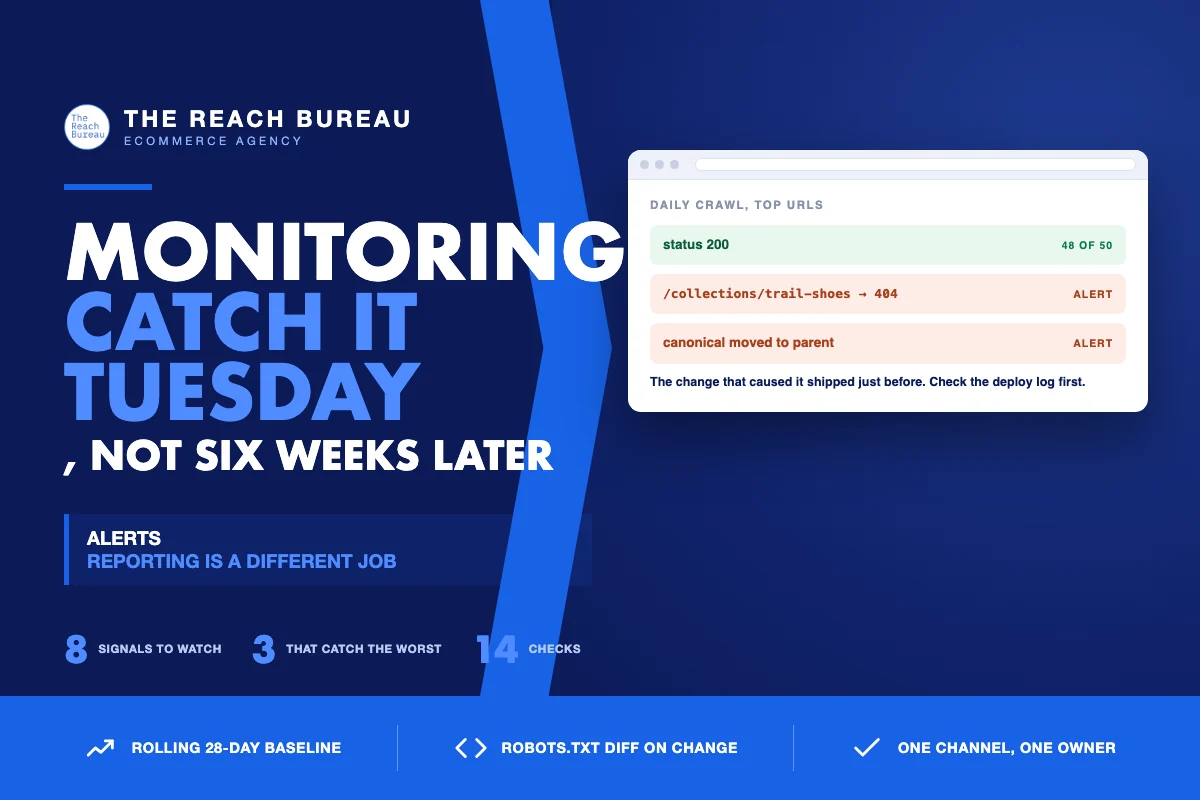
Most SEO damage on an ecommerce site is not caused by a competitor or an algorithm. It is caused by a change someone made, and it is found six weeks later when a report is read.
Reporting and monitoring are different jobs. A monthly report tells you how the quarter is going. Monitoring tells you that something broke on Tuesday. Almost every store has the first and not the second, which is why the same failure — a noindex shipped with a template, a canonical pointed at a parent, a robots rule that blocked a directory — keeps costing months of traffic.
This is about the second job: what to watch, what threshold to set, and how to keep the alerts quiet enough that someone still reads them.
The signals worth alerting on
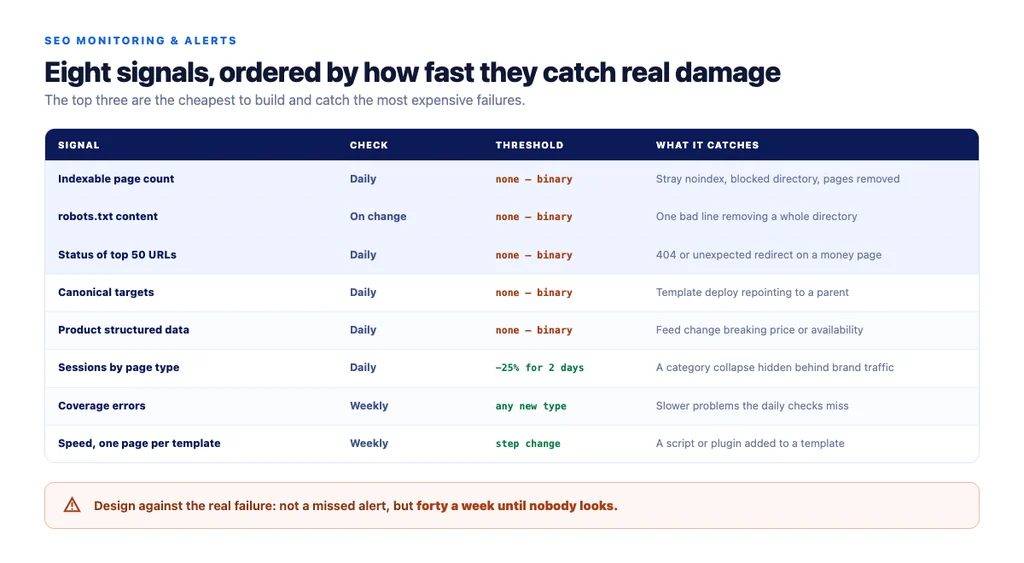
Ordered by how fast they catch real damage.
1. Indexable page count. A sudden fall means pages became noindex, blocked, or removed. This is the single highest-value alert because it catches the most expensive mistakes within a day.
2. robots.txt content. Alert on any change at all. The file is short, changes rarely, and one bad line can remove a directory from search.
3. HTTP status of key URLs. Your top 50 revenue pages, checked daily. A 404 or an unexpected redirect on a category page is a revenue event, not an SEO event.
4. Canonical target of key URLs. Template deployments silently repoint canonicals. Nothing else surfaces this quickly.
5. Structured data validity on product pages. A feed change or template edit breaks price or availability markup, and rich results quietly stop.
6. Organic sessions by landing-page group — category, product, article — not site-wide. A site-wide figure hides a category collapse behind healthy branded traffic.
7. Search Console coverage errors, weekly. Slower, but it catches problems the others miss.
8. Page speed on one representative page per template. Alert on a step change, not on daily noise.
Thresholds that do not cry wolf
An alerting system nobody trusts is worse than none, because the real alert arrives in a muted channel.
- Compare like periods. Tuesday against last Tuesday, not against Sunday. Ecommerce traffic is strongly weekly.
- Use a rolling baseline — a 28-day median — rather than a fixed number that goes stale.
- Require both size and duration. A 25% drop sustained for two days beats a 40% single-hour blip.
- Set different thresholds by page type. Product pages are noisy; category pages are stable, so a small category drop is more meaningful than a bigger product one.
- Alert on the technical signals with no threshold at all.
robots.txtchanged, page count fell, canonical moved — these are binary. There is no acceptable amount of "your category page became noindex". - Suppress known events. A planned migration will trip everything; mute deliberately rather than learning to ignore.
The failure mode to design against is not missing an alert. It is sending forty a week until nobody looks.
Where AI genuinely helps here
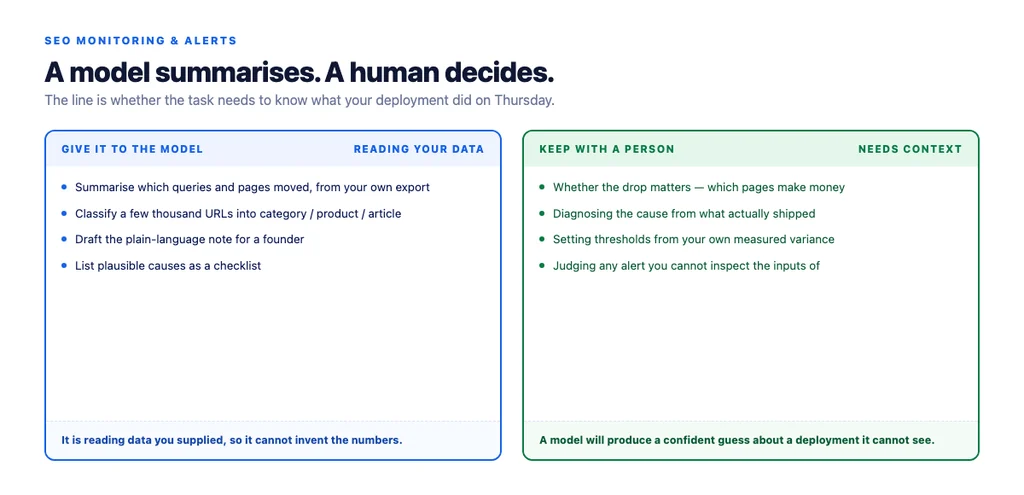
Summarising what changed. Given a Search Console export, a model can group which queries and pages moved and describe the pattern. It is reading data you supplied, so it cannot invent the numbers.
Classifying pages for grouping. Sorting a few thousand URLs into category, product and article so your alerts can be segmented. Tedious by hand, reliable by model, easy to spot-check.
Drafting the explanation. Turning "these 14 pages fell" into a readable note for a founder who does not want the raw table.
Suggesting hypotheses. Given the shape of a drop, a model is decent at listing plausible causes to check. Treat the list as a checklist, not as a diagnosis.
Where it does not
Deciding whether the drop matters. That needs to know which pages make money.
Diagnosing the cause. The model cannot see your deployment history, your feed, or the change someone made on Thursday. It will produce a confident-sounding guess.
Setting thresholds from nothing. Thresholds come from your own variance, which means measuring it first.
Anomaly detection you cannot inspect. If the system cannot show you which numbers triggered an alert, you cannot judge it, and you will end up ignoring it.
A monitoring setup that fits a small team
You do not need a platform. You need a handful of checks and somewhere they land.
1. A daily crawl of your top URLs recording status, canonical, robots meta, and title. Any change is flagged. 2. A daily indexable-count check against yesterday. 3. A robots.txt diff on every change. 4. A weekly Search Console pull grouped by page type, compared to the 28-day median. 5. One channel for alerts, read by a named person. Not an inbox rule. 6. A written runbook: for each alert type, the first three things to check. Without it, an alert at 9pm produces panic rather than a fix. 7. A monthly review of the alerts themselves — which fired, which were real. Prune the noisy ones.
Steps 1–3 catch most of the expensive failures and are the cheapest to build.
What to do when an alert fires
- Confirm it is real. Load the page. Check it as the crawler sees it, not only in a browser with your cache.
- Establish when it started. The change that caused it happened just before.
- Check what shipped. Deployment log, plugin update, feed import, someone editing a template.
- Fix, then verify the fix the same way you detected the problem.
- Write down what happened and add a check that would have caught it sooner.
That last step is how a monitoring setup improves. Every incident should leave behind one new check.
The checklist
- Indexable page count checked daily against yesterday
robots.txtdiffed on every change, alert with no threshold- Top 50 revenue URLs checked daily for status and redirects
- Canonical target of key URLs monitored
- Product structured data validity monitored
- Organic sessions grouped by page type, not site-wide
- Search Console coverage errors reviewed weekly
- Thresholds built from a 28-day rolling median
- Alerts require both magnitude and duration
- Planned events muted deliberately in advance
- One alert channel with a named owner
- A runbook naming the first three checks per alert type
- Alerts reviewed monthly and noisy ones pruned
- Every incident adds one new check
Sources
- Google Search Console Help — Google
- Introduction to robots.txt — Google Search Central
- Block Search Indexing with noindex — Google Search Central
- SEO Best Practices for Ecommerce Sites — Google Search Central
- Intro to Product Structured Data on Google — Google Search Central
Frequently Asked Questions
Want this run against your store? Book a call with The Reach Bureau.