
Most stores treat product pages as catalog entries. Search engines treat them as landing pages. Nearly every mistake below comes from that one gap.
A category page can rank on breadth. A blog post can rank on depth. A product page has to do something harder: satisfy a shopper who already knows roughly what they want, convince them this is the right version of it, and hand Google enough structured information to show price, availability, and reviews directly in the results.
These are the nine mistakes we find most often when we audit a store, in the order they cost the most money.
Mistake 1: Targeting a query the product page cannot win
The most expensive product page mistake happens before a word is written — choosing the wrong query.
A product page selling one specific trail running shoe should not target "running shoes." That term belongs to a category page, and its results are dominated by retailers with thousands of referring domains. The product page targets the version of the query that names the thing being sold.
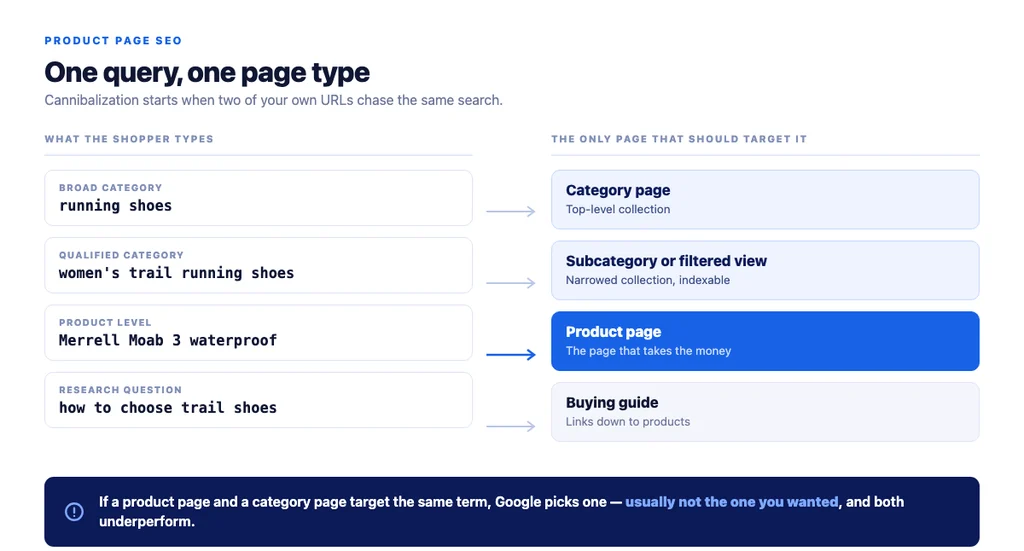
How to fix it. Sort your product queries by what kind of page can satisfy them:
| Query type | Example | Correct target page |
|---|---|---|
| Broad category | running shoes | Category / collection page |
| Qualified category | women's trail running shoes | Subcategory or filtered view |
| Product-level | [brand] [model] trail running shoe | The product page |
| Research question | how to choose trail running shoes | Buying guide, linking down to products |
Then check what already ranks. If page one is entirely category pages and buying guides, no product page will break in — the intent is not transactional yet. If it contains retailer product pages, the query is winnable.
Mistake 2: Letting your own pages compete with each other
This one is invisible until you look for it, and it is everywhere.
Cannibalization happens when two of your own URLs target the same query. Google picks one — usually not the one you wanted — and both underperform. It shows up in two forms:
- Product page versus category page. Both chase the same term because nobody decided which should own it.
- Product page versus product page. Variant-heavy catalogs publish near-identical URLs for colours and sizes, splitting the signals across a dozen pages.
How to fix it. Assign one target query per page and make the internal links agree with that choice. Where variants are genuinely the same product, use ProductGroup and Product variant markup rather than separate competing URLs, and let the canonical resolve to one page.
Mistake 3: Publishing the manufacturer's description
If you take one thing from this article, take this: manufacturer copy is the single biggest cause of invisible product pages.
When you paste the supplier's text, you publish a page that is textually identical to every competitor stocking that item. There is no duplicate content penalty in the punitive sense — Google simply picks a canonical version and filters the rest. If your domain is not the strongest one carrying that text, you are the one filtered out.
Rewriting at catalog scale is genuinely hard, which is why so few stores do it, and why it stays a real advantage for the ones that do.
How to fix it. A description needs to carry:
- The buying decision. What separates this model from the one above and below it in the range. Shoppers comparing three products want the difference stated, not the feature list restated.
- Fit, sizing, and use case. The questions your support inbox already answers. If customers keep asking whether it runs small, the answer belongs on the page.
- Specifics over adjectives. "Waterproof to IPX7, tested in 1m of water for 30 minutes" beats "premium water resistance."
- The language customers use — pulled from reviews, support tickets, and search queries, not the manufacturer's marketing vocabulary.
Google's guidance on creating helpful, reliable, people-first content applies directly. Its test is whether someone leaves the page having learned enough to make their decision. A restated spec list does not pass it.
Mistake 4: Generating every description from the product name
The fix for mistake 3 creates mistake 4 when it is automated carelessly.
Generating four thousand descriptions from the SKU name alone produces four thousand pages of confident, interchangeable text. That is a different flavour of the same duplicate problem you were trying to solve.
How to fix it. Feed the model real inputs — spec sheets, review themes, support questions, the genuine differences between variants — and hand-write the head of the catalog. Prioritise: write the revenue-carrying products yourself, generate the tail from structured inputs, and review a sample before publishing.
Mistake 5: Shipping no structured data — or shipping it client-side
This is the mistake with the clearest rules and the widest gap between the stores that get it right and the stores that do not.
Product structured data makes a page eligible for merchant listing experiences: the shopping knowledge panel, Google Images, popular product results, and product snippets. Without it, your page can rank as a plain blue link while a competitor's shows price, stock status, and a star rating.
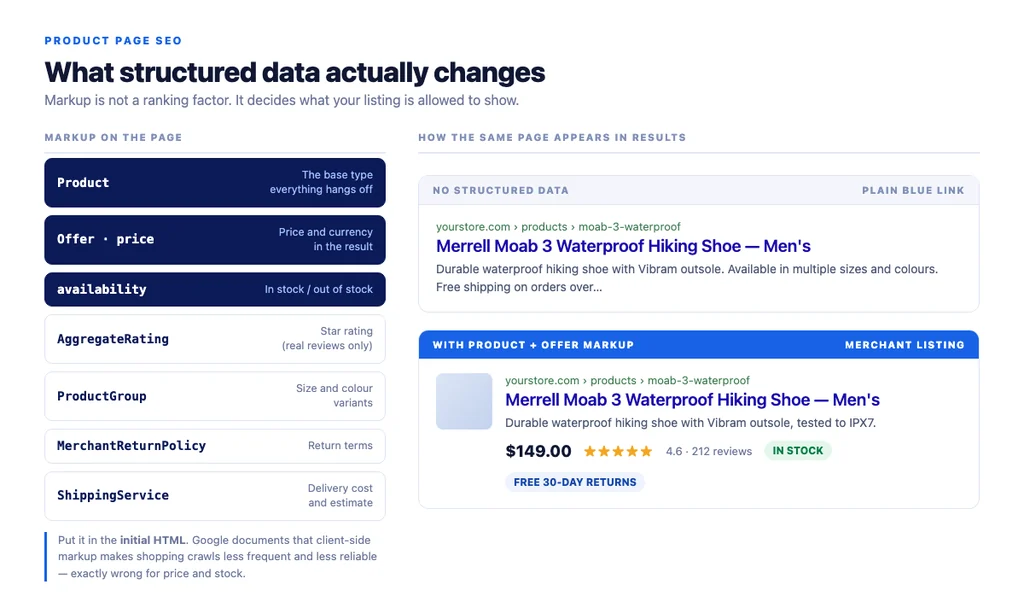
Per Google's Product structured data documentation:
- Only pages where a shopper can actually buy are eligible for merchant listing experiences. Pages linking out to other sellers do not qualify.
- Product rich results support pages focused on a single product or multiple variants of the same product.
- Put the markup in the initial HTML. Google's merchant listing documentation states that dynamically generated markup makes shopping crawls less frequent and less reliable — which matters most for the fields that change, price and availability.
That last point catches a lot of headless and heavily JavaScript-driven builds. If your structured data is injected client-side, verify what the crawler actually receives rather than what the browser renders.
How to fix it. Beyond the core Product type:
| Markup | What it enables |
|---|---|
Product + Offer | Price, currency, availability in results |
AggregateRating / Review | Star ratings on the listing |
ProductGroup + variant markup | Correct handling of size and colour variants |
MerchantReturnPolicy | Return terms shown in shopping surfaces |
ShippingService | Shipping cost and delivery estimates |
Return and shipping markup are the most underused and the most valuable, because they answer the two objections that stop a purchase. Google documents both — return policy and shipping policy — as separate types.
On WooCommerce, most SEO plugins emit a basic Product block; the variant, return, and shipping properties usually need to be added deliberately. Check the output rather than trusting the plugin's checkbox.
Mistake 6: Titles written for your database, not your shopper
Product titles are the highest-frequency mistake in ecommerce SEO because they are generated by a template nobody revisited.
SKU-4471 | Store Name communicates nothing. Merrell Moab 3 Waterproof Hiking Shoe — Men's | Store Name matches the query and earns the click.
How to fix it.
- Title tag: lead with brand, model, and the qualifier that distinguishes it.
- H1: one per page, matching the product name. Don't repeat the store name — it's already in the title tag and header.
- URL: readable and stable.
/products/merrell-moab-3-waterproof/is durable;/products/?id=4471&cat=17is not. If you change one, redirect the old one. - Meta description: not a ranking factor, but it's the ad copy for your listing. Write it per product for your top sellers; a template is acceptable for the tail.
Mistake 7: No reviews, and no answers to the questions buyers actually ask
Reviews solve three problems at once: they add unique text to an otherwise templated page, they answer the objections that stop conversions, and they make the page eligible for rating markup. They also compound — a page with two hundred reviews accumulates the long-tail vocabulary real buyers use, which you cannot invent in a description.
How to fix it.
- Ask for reviews after delivery, not after purchase. The timing changes response rate materially.
- Answer questions publicly on the product page. A customer Q&A block is unique content and addresses purchase hesitation directly.
- Never fabricate reviews or mark up ratings you have not collected. Google's structured data policies treat this as spam, and rating markup is actively policed.
Google's ecommerce documentation names merchant product reviews as content that helps shoppers find the right product — a legitimate signal, not a bolt-on.
Mistake 8: Lazy-loading the main product image
Product pages are image-heavy by nature, which makes them the pages most likely to fail Core Web Vitals — and the most common self-inflicted wound is lazy-loading the hero image.
The primary product image is usually the Largest Contentful Paint element. Lazy-loading it directly damages the metric it is measured by.
How to fix it.
- Lazy-load below the fold, never the main product image.
- Serve modern formats (WebP or AVIF) at correctly sized variants. A 2,400px hero scaled down in CSS on a phone wastes bandwidth on the connection least able to spare it.
- Set explicit dimensions so the layout doesn't shift while images load.
- Write alt text describing the product, including the model name — accessibility first, image search second.
Mistake 9: Deleting products instead of redirecting them
Deleting a product page that ranks is the most expensive routine mistake in ecommerce. The 404 throws away every link and every ranking the page earned.
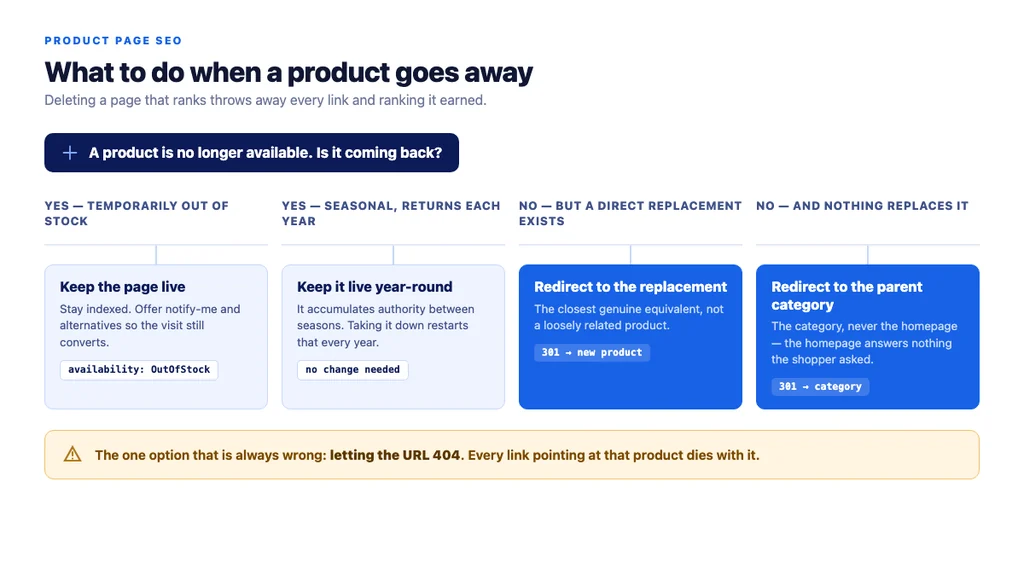
How to fix it. The handling depends on whether the product is coming back:
| Situation | Correct handling |
|---|---|
| Temporarily out of stock | Keep the page live and indexed, mark availability as OutOfStock, offer notify-me and alternatives |
| Discontinued, direct replacement exists | 301 redirect to the replacement product |
| Discontinued, no replacement | 301 to the parent category, not the homepage |
| Seasonal, returns annually | Keep live year-round; it accumulates authority between seasons |
The bonus mistake: blocking the crawlers you want
Product discovery increasingly happens inside assistants and AI Overviews. The searches sound different — "waterproof hiking shoe for wide feet under $150" rather than "hiking shoes" — and the answer is assembled rather than ranked.
Many stores block GPTBot, OAI-SearchBot, ClaudeBot, or PerplexityBot at the CDN or firewall through a generic bot rule, remove themselves from those surfaces entirely, and never find out.
Worth knowing: the fundamentals above serve AI search too. Structured data gives an assembled answer machine-readable facts. Specificity gets cited, because broad marketing copy is unusable in a comparison. Stores fixing these nine mistakes are already most of the way there.
The audit checklist
Run this against your top twenty products first — the ones carrying revenue — before touching the tail.
- The page targets a product-level query, not a category term
- No category page or sibling product targets the same query
- Description is original, not the manufacturer's
- Differences from adjacent models stated explicitly
- Fit, sizing, and common support questions answered on the page
- Title leads with brand and model, not SKU
- One H1, clean and stable URL
Product+Offermarkup with price and availability- Markup in the initial HTML, not injected client-side
- Variant, return, and shipping markup implemented
- Rating markup only where real reviews exist
- Main product image not lazy-loaded
- Modern image formats with explicit dimensions
- Descriptive alt text including the model name
- Linked from category text, not only the product grid
- Linked from any relevant buying guide
- Out-of-stock and discontinued policy defined and applied
- AI crawlers not blocked at the edge
Frequently Asked Questions
Sources
- Intro to Product Structured Data on Google — Google Search Central
- How To Add Merchant Listing Structured Data — Google Search Central
- Product Variant Structured Data (ProductGroup, Product) — Google Search Central
- Merchant Return Policy Structured Data — Google Search Central
- Merchant Shipping Policy Structured Data — Google Search Central
- Creating Helpful, Reliable, People-First Content — Google Search Central
- SEO Best Practices for Ecommerce Sites — Google Search Central
Want this run against your store? Book a call with The Reach Bureau.