# Product Page SEO Checklist: What to Verify Before You Ship
Most product page checklists are a list of tags. This one is grouped by what each check protects, because that is what tells you whether an item can be skipped. A store shipping a new template needs all of it once; a store auditing an existing catalogue needs the template-level items and can sample the rest.
Run it against the template, not one page. Every finding on a product page is a finding on every product page.
Indexability — does the page exist for search at all
- The URL returns 200 to a crawler user agent, verified at the CDN and firewall layer, not only in `robots.txt`.
- No `noindex` inherited from a bulk plugin setting or a staging leftover.
- Self-referencing canonical on the parent product page.
- Variant URLs canonicalised consistently with how they are linked and submitted — not canonicalised away and sitemapped at the same time.
- Present in the sitemap, and the sitemap reflects live stock rather than every product ever created.
- Reachable by at least one crawlable link from a category, not only through a JavaScript filter.
If any of the first three fail, nothing below them matters yet.
Relevance — is the page aimed at a real query
- One target query per page, chosen from what shoppers type rather than what the manufacturer calls it.
- Title tag leading with the product name and the distinguishing attribute, not the brand boilerplate.
- `h1` matching what the page is about, and only one of them.
- Meta description written as a reason to click, not a keyword list.
- Image filenames and alt text describing the product, useful both for image search and for accessibility.
- Internal links in from the relevant category and from any guide that recommends the product, with the anchor a shopper would use.
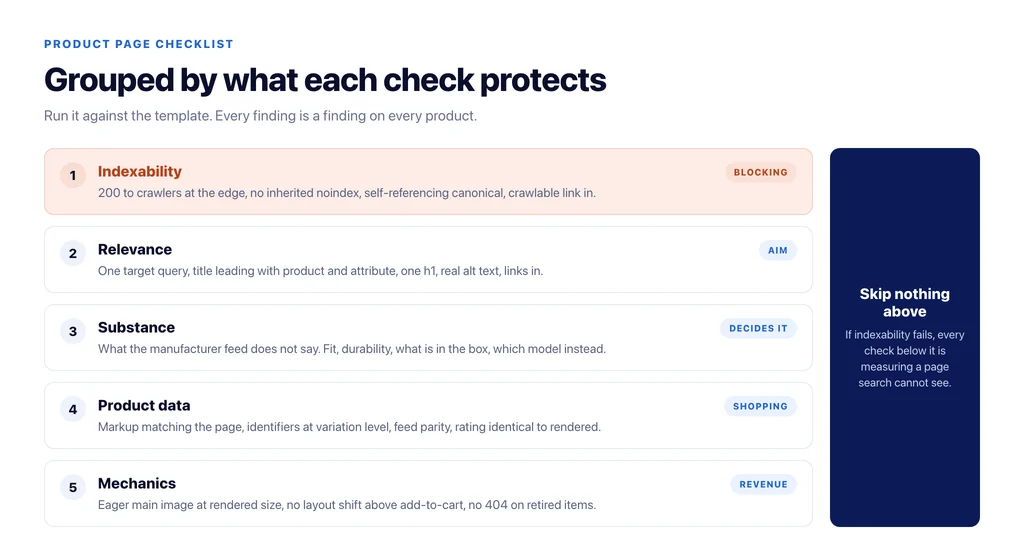
Substance — does the page resolve the decision
- Content the manufacturer’s feed does not contain: fit relative to other brands, behaviour over time, what is in the box, which adjacent model to choose instead.
- Specific, checkable facts — dimensions, weight, capacity, compatibility, materials — in rendered HTML rather than only in structured data or a click-to-load tab.
- The three questions your support team gets about this product, answered on the page.
- Reviews shown, aggregated at product level rather than split across variants.
- Delivery expectation and returns terms visible before the add to cart, not discovered at checkout.
Item 13 is the one that decides whether the page can outrank a marketplace listing for the same product, and it is the one most stores skip.
Product data — can shopping surfaces use it
- `Product` markup with price, availability and currency matching what the page displays.
- A real identifier — GTIN or MPN — and `brand`, present at variation level, not only on the parent.
- Feed and page agreeing on price and availability, checked continuously rather than at launch.
- `BreadcrumbList` matching the visible path.
- Rating in the markup identical to the rating rendered.
Disagreement between markup, feed and page is worse than absence, because it makes the whole record untrustworthy.
Mechanics — the things that quietly cost money
- The main product image loads eagerly, is served at the rendered size, and is not lazy-loaded.
- No layout shift as the gallery, price or stock notice loads — particularly above the add-to-cart button on mobile.
- Out-of-stock behaviour decided: keep the page with alternatives and a restock signal, or redirect if the product is retired. Never a 404.
- Discontinued variants redirected to the parent rather than deleted.
What to check when a product page used to rank and stopped
A different situation from launching a template, and the checks are different too.
Start with what changed on the page rather than what is wrong with it. Compare the current markup, title and content against an archived version — a theme release, a plugin update or a feed change is the usual cause, and the date of the drop usually matches a deployment.
Then check whether the product is still the best answer. Rankings fall because competitors improved as often as because something broke, and a page written three years ago against a weaker set of competitors will decay without any technical fault at all.
Then check availability history. A product that was out of stock for a month during the drop explains itself, and the recovery is usually automatic once stock returns — provided the page stayed live and did not start returning a 404 or redirecting to the category while it was gone.
The three checks that catch template bugs
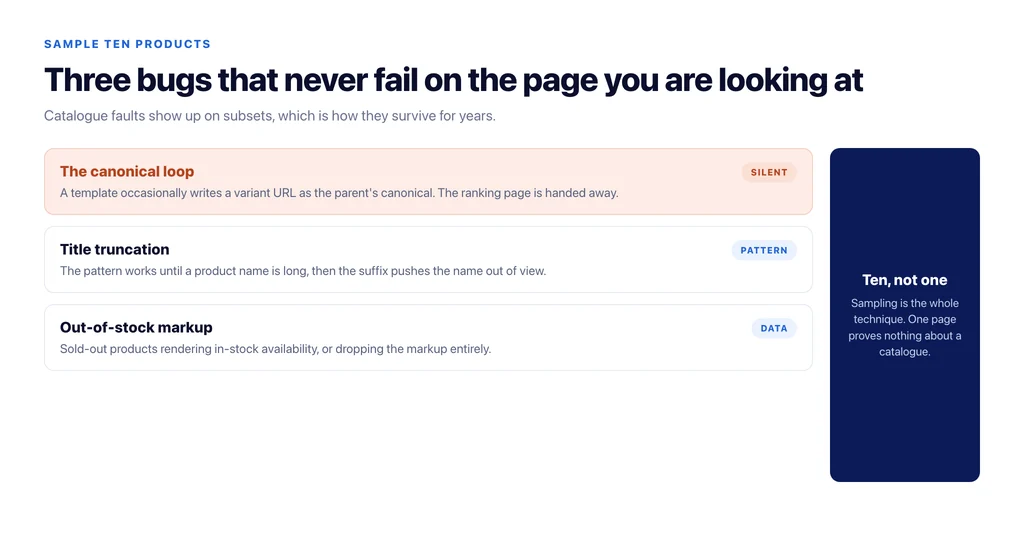
Run these against ten random products rather than one:
Does the parent canonicalise to itself on every one, or does a template loop occasionally write a variant’s URL?
Does the title tag pattern still make sense for products with long names, or does the suffix push the name out of the visible portion?
Do out-of-stock products render the same markup as in-stock ones, with `availability` correctly set?
Those three are where catalogues break silently, because they only fail on a subset of products and never on the one you are looking at. The broader diagnostic order for a store that is not ranking is in why your ecommerce site is not ranking.
Sources
- Product structured data — Google Search Central
- Product variant structured data — Google Search Central
- Breadcrumb structured data — Google Search Central
- Canonicalization — Google Search Central
- SEO best practices for ecommerce sites — Google Search Central
Frequently Asked Questions
Want this run against your store? Book a call with The Reach Bureau.