
# Ecommerce Technical SEO Audit: The Order That Finds Real Problems
Most technical SEO audits on ecommerce sites produce a list of two thousand issues and change nothing. The crawler reports every missing alt attribute and every long title, the report gets forwarded, and six months later the same problems are still there because nobody could tell which of the two thousand items was costing money.
The problem is not the tooling. It is the order. A technical audit is a diagnostic sequence, and the sequence matters, because a finding at step four is meaningless if step one is broken. This is the order we run, and what each step is actually looking for on a store.
Step one: can search engines reach the site at all
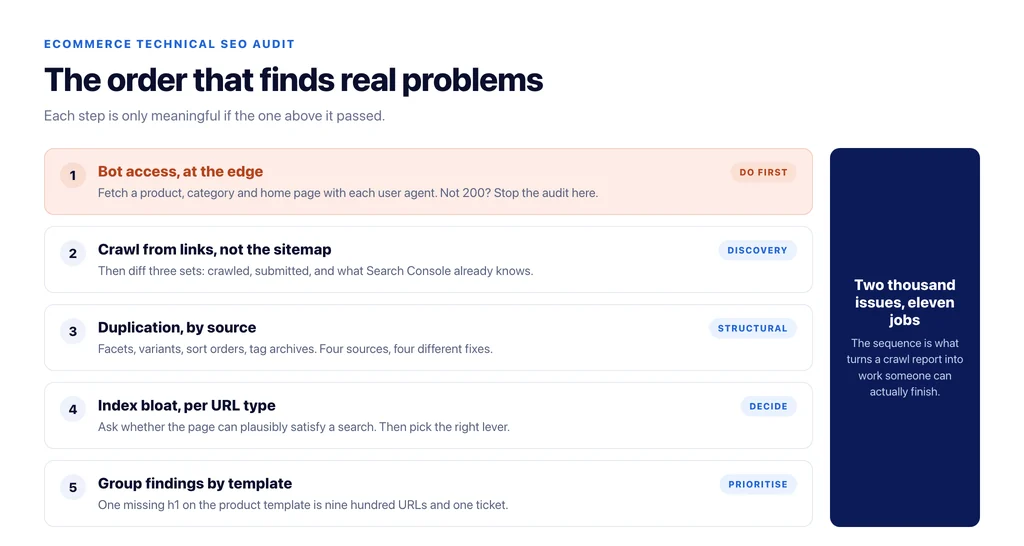
Before crawling anything, confirm that the bots you care about get a 200 response. Not that `robots.txt` looks permissive — that a request with the bot’s user agent actually reaches the page.
This sounds trivial and it is the single most common finding that changes outcomes. Blocks live in three places that no `robots.txt` check will show you: the CDN or WAF layer (Cloudflare’s bot rules, for example, can be on by default), the hosting firewall, and a WordPress security plugin that rate-limits or challenges unfamiliar agents. A store can have a perfect `robots.txt` and still serve 403 to a crawler at the edge.
Fetch a product page, a category page, and the homepage with each relevant user agent and record the status code. If any of them is not 200, stop the audit and fix that first. Everything downstream is measured against a site the crawler cannot read.
Step two: crawl what exists, not what the sitemap claims
The sitemap is a claim about what should be indexed. It is not evidence of what a crawler will find. Crawl from the homepage, following links, with parameters and facets enabled, and compare three sets:
- URLs a crawler discovers by following links,
- URLs in the sitemap,
- URLs Google reports as known in Search Console.
The gaps are the findings. URLs discovered but not in the sitemap are usually facets, sort orders, and session parameters the store never intended to expose. URLs in the sitemap but not discoverable by crawling are orphans — usually products that lost their category, or old campaign pages nothing links to any more. URLs Google knows and you do not are the interesting ones: they are typically parameter combinations generated years ago that still return 200.
Step three: duplication, before anything else about content
On a store, duplication is structural, not editorial. It comes from a small number of predictable sources, and each has a different correct fix:
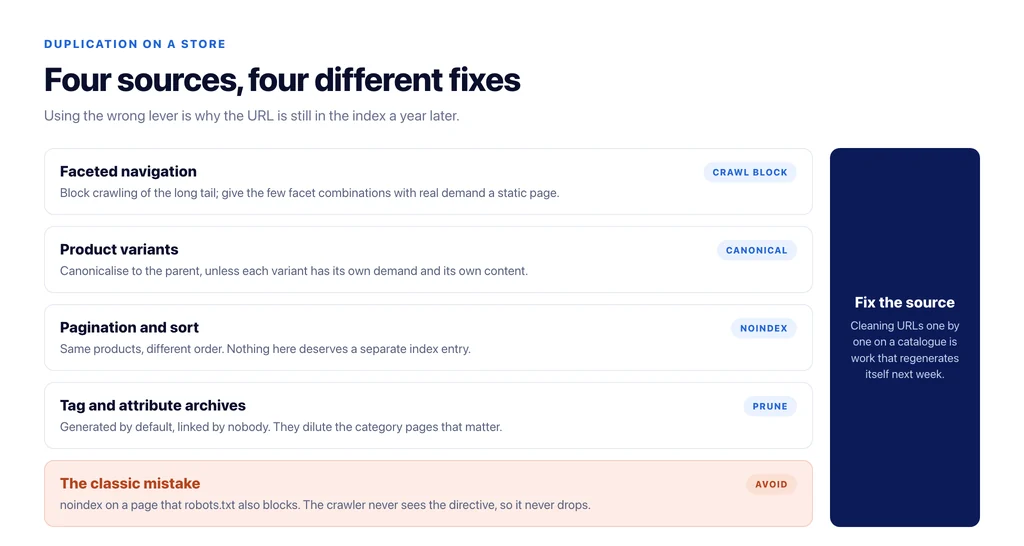
Faceted navigation. `?color=blue&size=m` returning a full indexable page is the largest single source of duplicate URLs on most catalogs. The fix is not `noindex` on everything — some facet combinations have real demand and deserve a static, crawlable page. The rest should be blocked from crawling, not just from indexing, so crawl budget is not spent on them.
Product variants. One product with eight colours should not be eight indexable URLs competing with each other unless each variant has its own demand. Canonicalise variants to the parent and let the variant selection happen without a URL change, or commit to separate pages with genuinely different content.
Pagination and sort. `?orderby=price` is the same set of products in a different order. It needs no separate index entry.
Tag and attribute archives. WooCommerce generates archives for tags and attributes by default. Most stores never look at them and never link to them, and they sit in the index diluting the category pages that matter.
Step four: index bloat — what to remove and what to keep
Once duplication is mapped, decide what leaves the index. The question to ask about each URL type is whether it can plausibly satisfy a search. A thin tag archive with three products cannot. A category page with forty products and a real description can.
Removal has three levers and they are not interchangeable. `noindex` keeps the page reachable but drops it from results — right for pages users need and search does not. `robots.txt` blocks crawling but does not reliably remove already-indexed URLs — right for infinite parameter space, wrong as a cleanup tool. A 301 consolidates signals — right for retired products and merged categories.
The most common mistake here is blocking a URL in `robots.txt` that also carries a `noindex`. The crawler cannot fetch the page, so it never sees the directive, and the URL stays in the index indefinitely.
Step five: fix templates, not pages
Every finding on a store repeats across a template. One missing `h1` on a product page is one finding. It is also nine hundred findings, because the product template is missing an `h1`.
Group every issue by template before writing a single ticket: product, category, blog post, cart, checkout, search results, account. Then count. A template-level fix that touches nine hundred URLs is worth a developer’s afternoon. A page-level fix that touches one URL almost never is. This single grouping step is what turns a two-thousand-item crawl report into a list of eleven jobs.
Step six: performance, measured in the field
Lab scores are useful for debugging and useless for prioritising. A Lighthouse run in a data centre tells you what a page could do; field data tells you what shoppers experienced. Prioritise from field data, then use lab tools to find the cause.
This is also where audits mislead people most often, because logged-in administrators frequently see a completely different site: page caching is bypassed for logged-in sessions, so the person running the audit measures an uncached page that no visitor ever gets. Check in a private window before believing a slow number. We covered how to measure this properly in how site speed influences ecommerce SEO and conversions.
Step seven: structured data that a machine can actually use
For a store, the markup that earns anything is narrow: `Product` with price, availability, and a real identifier; `Offer` matching what the page displays; `BreadcrumbList` for the path; `ItemList` on category pages. Everything else is optional.
Two checks matter more than validator errors. First, does the markup agree with the visible page — a price of $49.99 in JSON-LD and $54.99 on the page is worse than no markup. Second, does it agree with the product feed, if there is one, because a mismatch between feed and page is a common cause of quiet disapprovals.
WooCommerce’s default markup omits `brand` and `gtin`, which is fine for organic and a problem for Merchant Center. Fill those through the SEO plugin’s field mapping rather than a hand-written filter, so they survive the next theme change.
Step eight: decide what becomes monitoring
An audit is a snapshot. The findings that recur — new duplicate parameters, products falling out of the index, a template regression after a release — should not wait for the next audit. Those become alerts.
Automate detection and keep judgement manual. A crawler can tell you that four hundred URLs became `noindex` last night. Deciding whether that was correct is not a job for a rule. We wrote about where that line sits in what to automate and what not in SEO.
The audit order, as a checklist
- Bot access confirmed at the edge, not in `robots.txt`.
- Crawl from links, with parameters on; diff against sitemap and Search Console.
- Duplication mapped by source: facets, variants, sort, tag archives.
- Index bloat decided per URL type, with the right lever for each.
- Findings grouped by template and counted.
- Performance prioritised from field data, verified logged out.
- Structured data agreeing with the page and the feed.
- Recurring findings converted into alerts.
Run in that order, a technical SEO audit on a mid-size catalogue produces something closer to a dozen jobs than a thousand. That is the point of the sequence: not to find everything, but to find the things that are costing you money, in the order that lets someone actually fix them.
Sources
- Introduction to robots.txt — Google Search Central
- Consolidate duplicate URLs — Google Search Central
- Block search indexing with noindex — Google Search Central
- Crawling and managing faceted navigation — Google Search Central
- Product structured data — Google Search Central
- Merchant listing structured data — Google Search Central
Frequently Asked Questions
Want this run against your store? Book a call with The Reach Bureau.