# Ecommerce Category Page Best Practices That Hold Up
Category pages carry more commercial demand than product pages on most stores, and they are usually the least maintained templates in the catalogue. The advice they attract is either cosmetic or actively harmful — a paragraph of keyword-stuffed copy under the product grid, added once, never read by anybody.
These are the practices that survive contact with a real store, including the awkward cases: rotating collections, near-empty categories, and filters that generate pages you never intended to have.
Decide what the page is for before writing anything
A category page has one job: get a shopper from a broad intent to the right product with the fewest decisions. Everything else on the page is in service of that or is in the way.
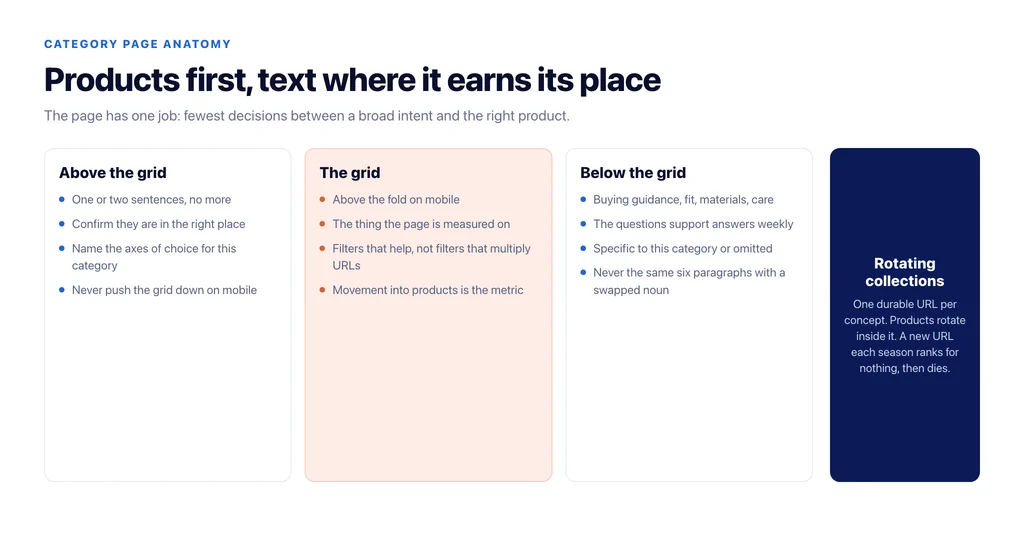
That framing settles most arguments. The product grid comes first. Text exists to make a choice easier, not to reach a word count. Anything that pushes products below the fold on mobile is costing you the thing the page is measured on.
Put the useful text above the grid, in one or two sentences
The pattern that works is a short introduction — one or two sentences that confirm the shopper is in the right place and name the distinctions that matter in this category — followed immediately by products.
For a category like running shoes, useful means naming the axis of choice: cushioning, terrain, drop. Useless means saying that running shoes are important for runners. The test is whether a sentence helps someone choose, or just occupies space.
Put the depth below the grid, where it can be long
Below the products is where a category page can earn rankings for the long variants of the query without hurting the shopping experience. This is the right home for buying guidance, sizing and fit, materials, care, and the three or four questions your support team answers about this category every week.
The mistake here is duplication. Every category gets the same six paragraphs with the noun swapped, and Google treats it exactly as the templated filler it is. If you cannot write something specific to a category, leave the section out for that category.
Handle rotating collections without churning URLs
New arrivals, trending, seasonal, sale. These are the pages that break, because their inventory turns over and the page becomes empty or the store creates a new URL each season.
Keep one durable URL per concept and rotate the products inside it. `/new-arrivals/` should always exist and always have products. Creating `/spring-2026-arrivals/` each year gives you a page that ranks for nothing in month one and a dead URL in month thirteen. If you need seasonal pages for campaigns, keep them, but make them non-indexable and point them at the durable page.
Give thin categories a job or remove them
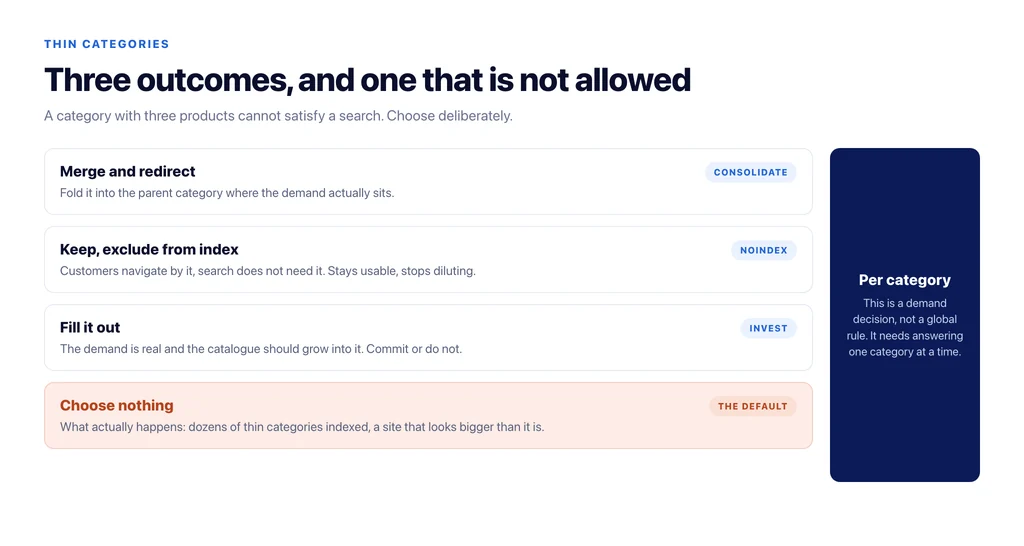
A category with three products cannot satisfy a search, and a store accumulates dozens of them. There are three legitimate outcomes: merge it into a parent category and redirect, keep it live but exclude it from the index because customers use the navigation, or fill it out because the demand is real and the catalogue should grow into it.
Choosing nothing is what produces index bloat and the impression of a bigger site than you actually have.
Control what filters create
Faceted navigation is where category strategy is usually lost. A filter combination that has real demand — a colour, a size, a price bracket people actually search — deserves a static, indexable, linked page with its own short introduction. Every other combination should be reachable for shoppers and closed to crawlers.
Deciding which is which is a demand question, not a technical one, and it needs answering per category rather than by a global rule. The technical implementation, once the decision is made, is described in Google’s own guidance on faceted navigation.
Internal links from the pages that have them
Category pages are usually orphaned from anything but the navigation menu. The fix is unglamorous and effective: link to them from the blog posts that discuss the category, from the parent category text, and from related categories where a shopper would plausibly cross over.
This is the cheapest ranking lever a store has and the one most consistently left unused — see internal linking for ecommerce for how to prioritise it.
What belongs in the depth section, category by category
The generic version of this advice — add helpful content below the grid — is why the section usually ends up templated. It is easier to decide with a rule: the depth section should contain the three things a shopper asks a human before buying from this category.
For apparel that is fit relative to other brands, fabric behaviour after washing, and what to do about being between sizes. For furniture it is dimensions in context, assembly reality, and material durability with pets or children. For electronics it is compatibility with what they already own, what is in the box, and which of two adjacent models to choose. For consumables it is how long one lasts, how to store it, and what the equivalent is if their usual choice is out of stock.
None of that is keyword work. It is the content your support inbox already contains, and it is the only text on a category page that no competitor can copy from your product feed.
What to measure
Not rankings alone. A category page is working when it moves shoppers into products: click-through from the grid, add-to-cart rate from the category, and revenue attributed to the entry page. A page that ranks and does not move anyone into a product has an intent or merchandising problem, not an SEO one.
The checklist
- Product grid above the fold on mobile.
- One or two sentences of orientation above the grid, naming the axes of choice.
- Depth below the grid, specific to this category or omitted.
- Durable URLs for rotating collections; products rotate, URLs do not.
- Every thin category merged, excluded, or filled — never left drifting.
- Filter pages indexable only where the demand is real, and linked when they are.
- Internal links in from blog content and sibling categories.
- `ItemList` and `BreadcrumbList` markup that matches what is on the page.
- Measured on movement into products, not just position.
Sources
- Crawling and managing faceted navigation — Google Search Central
- Breadcrumb structured data — Google Search Central
- Carousel (ItemList) structured data — Google Search Central
- SEO best practices for ecommerce sites — Google Search Central
Frequently Asked Questions
Want this run against your store? Book a call with The Reach Bureau.