
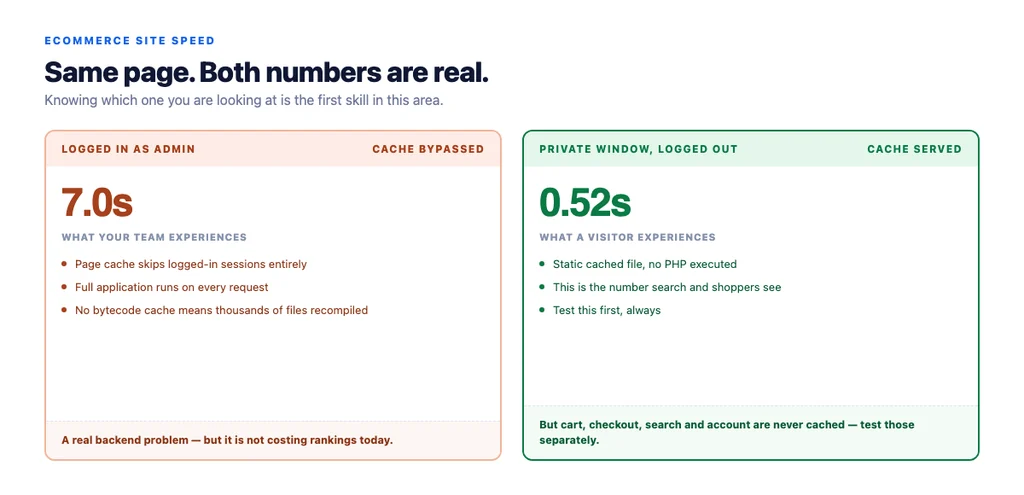
The most common site speed conversation starts with the wrong number. Someone logged into the admin loads a page, waits seven seconds, and reports that the site is slow. Meanwhile visitors are being served a cached page in half a second and nothing is wrong with what they experience.
Both observations are true. They are measurements of different things, and knowing which one you are looking at is the first skill in this area.
Measure what a visitor gets, first
Test in a private window, logged out. This is the single most useful habit here. Page caches — WP Rocket, LiteSpeed, Varnish, a CDN — typically bypass logged-in users entirely, so an admin experiences the uncached, fully-rendered application on every request while visitors get a static file.
Test the page types, not the homepage. A category page with fifty products and a filter sidebar is a different animal from the homepage everybody benchmarks.
Separate first visit from repeat visit. A repeat visitor has your assets cached. The first visit is the one that decides.
Use field data as the verdict and lab data for diagnosis. Real-user measurements tell you what is happening; a lab tool tells you why.
Check mobile on a real connection. A throttled desktop simulation is a reasonable proxy; an actual mid-range phone on mobile data is the truth.
If a logged-out first visit on mobile is fast and an admin session is slow, you have a backend problem worth fixing for your team's sanity — but it is not costing you rankings or conversions today.
What actually makes ecommerce sites slow
In rough order of how often it is the real cause.
1. Server-side execution with no bytecode cache. On PHP platforms, opcode caching being disabled means every request recompiles thousands of files. This is invisible from the front end when page caching hides it, and it dominates the moment caching is bypassed — logged-in sessions, cart, checkout, search, and any request with a query string.
2. Uncached dynamic paths. Cart, checkout, account and search are exactly the pages where slowness costs revenue, and exactly the pages page caching skips. Optimising the homepage while checkout takes four seconds is the classic misallocation.
3. Too many database queries per page. Usually a plugin, or a template calculating something per item in a loop of fifty products.
4. Unoptimised images. Still extremely common: full-resolution JPEGs where a WebP at a sensible width would do. The cheapest large win on most stores.
5. Third-party scripts. Chat widgets, analytics, tag managers, review platforms, personalisation. Each one is a request to someone else's server and their bad day is your slow page.
6. Render-blocking CSS and JavaScript in the head.
7. No CDN, so every asset travels from one location.
8. Layout shift from late-loading elements — banners, chat launchers, cookie notices. Not slowness exactly, but it is measured and it is felt.
The order to fix things
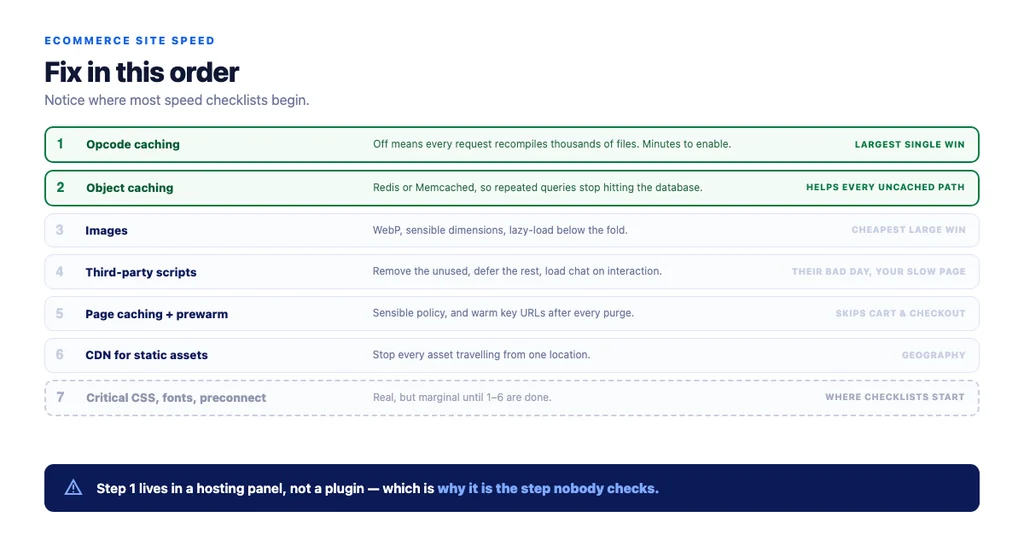
1. Turn on opcode caching if it is off. Minutes of work, often the largest single improvement on a PHP store, and it helps every uncached path. 2. Add object caching — Redis or Memcached — so repeated database queries stop hitting the database. 3. Convert and resize images. WebP, sensible dimensions, lazy loading below the fold. 4. Audit third-party scripts. Remove what nobody uses, defer the rest, and load the chat widget on interaction. 5. Page caching with a sensible policy, and prewarm your most important URLs after any purge. 6. A CDN for static assets. 7. Then micro-optimise — critical CSS, font loading, preconnect hints.
Most teams start at step 7 because it is the advice available in a checklist, and stop before step 1 because it lives in a hosting panel rather than in a plugin.
What speed does and does not do for rankings
It is a real but modest ranking factor. Google has been consistent that page experience is one signal among many, and that content relevance dominates. A fast page does not outrank a more relevant slow one.
It is a threshold rather than a gradient. Going from painful to acceptable matters. Going from good to slightly better rarely shows up in rankings at all.
Crawl efficiency is real. Slow responses reduce how much of a large catalogue gets crawled, which matters more on ten thousand URLs than on two hundred.
Rendering matters more than raw speed for whether content is seen at all. Content that only appears after heavy JavaScript is a bigger risk than content that appears slowly.
What speed does for conversion
This is where the commercial case actually lives, and it is stronger than the SEO case.
- Checkout speed affects completion directly and measurably.
- Mobile is where the loss concentrates, because that is where connections are worst and patience is shortest.
- Category page speed affects depth of browsing, which affects the chance of finding something to buy.
- Layout shift causes mis-taps on mobile, which produces both frustration and accidental navigation.
Run the numbers on your own store before quoting anyone's industry statistic: compare conversion rate by device and by page-load bucket in your own analytics. Your figure will be more persuasive internally than any benchmark, and it will be true.
Measuring it honestly
- Field data for the verdict, split by device and page type.
- Lab data for diagnosis only. A score is a diagnostic aid, not a goal.
- Time to first byte as the server-side signal, measured on an uncached path.
- Conversion rate by page-load bucket, from your own data.
- Checkout completion rate before and after changes.
- A control group where feasible, because seasonality moves both speed and conversion.
- Watch it after every deploy. Speed regressions arrive with plugin updates and template changes, quietly.
The checklist
- Tested logged out, in a private window
- Category, product, cart and checkout tested separately
- First visit distinguished from repeat visit
- Mobile tested on a real device and connection
- Field data used for the verdict, lab data for diagnosis
- Opcode caching confirmed enabled
- Object caching in place
- Images converted to WebP at sensible dimensions
- Third-party scripts audited, unused ones removed
- Chat and non-critical widgets loaded on interaction
- Page cache policy set, key URLs prewarmed after purge
- CDN serving static assets
- Time to first byte measured on an uncached path
- Conversion rate compared by device and load bucket, using own data
- Checkout completion tracked across changes
- Speed re-checked after every deploy
Sources
- Page Experience in Google Search Results — Google Search Central
- Core Web Vitals and Search — Google Search Central
- SEO Best Practices for Ecommerce Sites — Google Search Central
- Google Search Essentials — Google Search Central
- Crawl Budget Management for Large Sites — Google Search Central
Frequently Asked Questions
Want this run against your store? Book a call with The Reach Bureau.