An on-site chatbot is a UX decision with SEO consequences, and it is almost always evaluated the wrong way round. The question is not whether a chatbot helps SEO — it does not, directly. The question is whether it solves a real problem for your shoppers without damaging the page it sits on.
Some do. Most, as deployed, do not.
What a chatbot genuinely fixes
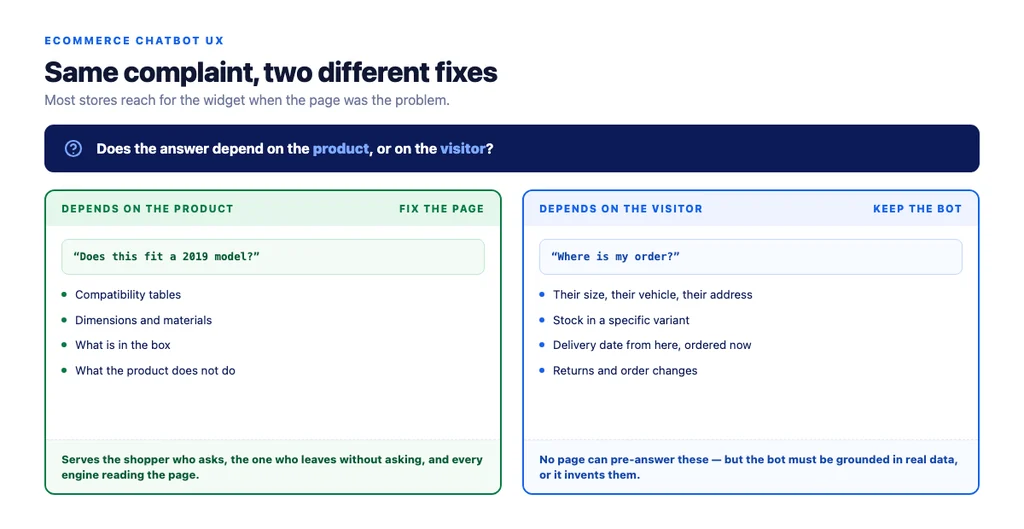
Questions your pages do not answer. Will this fit a 2019 model? Is it in stock in my size? When will it arrive if I order now? These are constraint questions, they are specific to the visitor, and they are why people abandon.
Post-purchase queries. Where is my order, how do I return this, can I change the address. This is the highest-value use and the least discussed, because it deflects support volume that costs money.
Navigating a large catalogue. On a store with thousands of SKUs, a conversational filter can genuinely beat a filter sidebar — but only if it is connected to real inventory data, not a keyword search dressed up as a conversation.
Availability outside working hours. A useful answer at 11pm beats a contact form.
Notice what these have in common: they are all cases where the information exists somewhere but is not on the page the visitor is looking at. That is the actual diagnosis, and it points at a second option.
The alternative nobody considers
If shoppers keep asking the same five questions, the fix might be to answer them on the page.
A chatbot that answers "does this fit a 2019 model" a thousand times is compensating for a compatibility table that should be in the product description. Adding the table serves the shopper who would have asked, the shopper who would have left without asking, and search engines and AI assistants reading the page — none of which can use the chatbot.
The chatbot is the right answer when the question depends on the visitor: their vehicle, their size, their delivery address, their order. It is the wrong answer when the question depends only on the product.
What a bad chatbot breaks
Page speed. Chat widgets are frequently the heaviest third-party script on an ecommerce site, and they load on every page including ones nobody chats from. Measure yours before and after; the number is often uncomfortable.
Layout stability. A widget that pops in after load shifts content and hurts Cumulative Web Vitals. A proactive panel that opens over the product image on mobile is worse.
Mobile usability. On a small screen a chat launcher covering the add-to-cart button is a conversion problem that will not show up in any SEO report.
Content visibility. Answers that exist only inside the chat are invisible to search engines and AI assistants. If the bot has good information about your products, that information belongs on the page too.
Trust. A bot confidently giving a wrong delivery date or returns answer is worse than no bot. This is not hypothetical — a bot connected to a general model without grounding in your actual policy data will invent plausible answers.
How to deploy one without the damage
1. Load it lazily. On interaction, or after the page is interactive. Not in the head. 2. Do not load it everywhere. Product, cart, checkout and support pages, plausibly. Blog articles, rarely. 3. Reserve its space so nothing shifts when it appears. 4. Never cover the primary action on mobile. Test this on a real phone. 5. No proactive pop-up in the first interaction. It is intrusive, and Google's guidance on intrusive interstitials exists for a reason. 6. Ground it in real data — your inventory, your policies, your order system. An ungrounded bot inventing a returns window is a liability. 7. Give it a clear route to a human for anything it cannot answer. 8. Mine the transcripts monthly and move recurring answers onto the pages. This is the step that produces the SEO value, and it is the step everybody skips.
The transcript loop
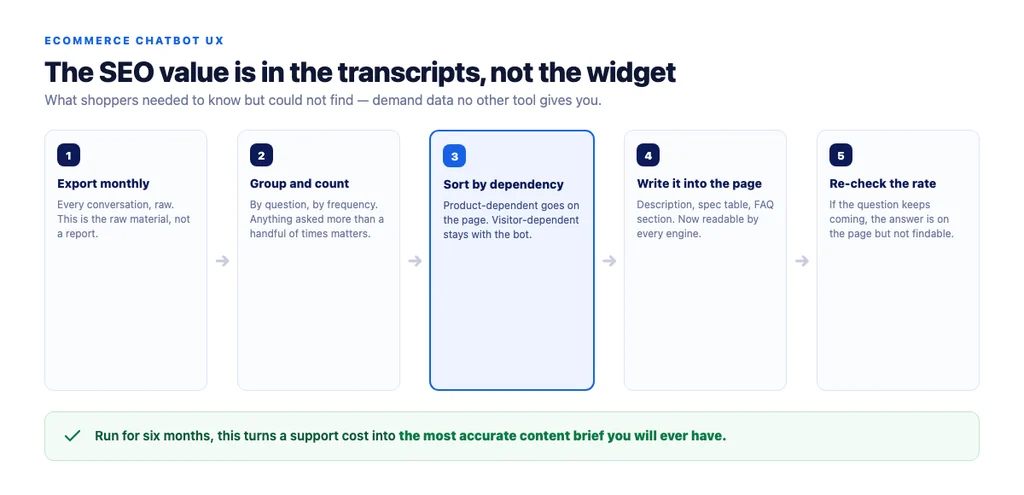
The genuine SEO value of a chatbot is not the widget. It is the record of what shoppers ask, in their own words, before buying.
That is demand data you cannot get any other way. Search Console shows what people typed into a search engine; the transcripts show what they needed to know but could not find on your page.
The loop:
1. Export the transcripts monthly. 2. Group by question, count frequency. 3. For any question asked more than a handful of times, decide: is this product-dependent or visitor-dependent? 4. Product-dependent goes onto the page — the description, the specification table, an FAQ section. 5. Visitor-dependent stays with the bot, and gets checked for accuracy. 6. Track whether the question rate falls after the page change. If it does not, the answer is not findable.
Run for six months, this turns a support cost into the most accurate content brief you will ever have.
Deciding whether you need one at all
You probably do if: your catalogue is large and compatibility matters, your support inbox is full of the same questions, or your post-purchase enquiry volume is meaningful.
You probably do not if: your catalogue is small, your product pages already answer the common questions, or your traffic is low enough that the script weight costs more than the widget earns.
The honest default for a small store is to spend the same effort on making product pages answer the questions properly. It serves everybody, including the readers a chatbot cannot reach.
The checklist
- A real problem identified before choosing a tool
- Product-dependent questions answered on the page instead
- Widget loaded lazily, not in the head
- Not loaded on pages nobody chats from
- Space reserved so nothing shifts on load
- Primary action never covered on mobile, tested on a real device
- No proactive pop-up on first interaction
- Grounded in real inventory, policy and order data
- Clear escalation route to a human
- Page speed measured before and after deployment
- Transcripts exported and grouped monthly
- Recurring product questions moved onto pages
- Question rate re-checked after each page change
Sources
- Page Experience in Google Search Results — Google Search Central
- SEO Best Practices for Ecommerce Sites — Google Search Central
- Creating Helpful, Reliable, People-First Content — Google Search Central
- Google Search Essentials — Google Search Central
- Ecommerce Product Data and Content on Google — Google Search Central
Frequently Asked Questions
Want this run against your store? Book a call with The Reach Bureau.