# Google Shopping Ads for Ecommerce: The Feed Decides It
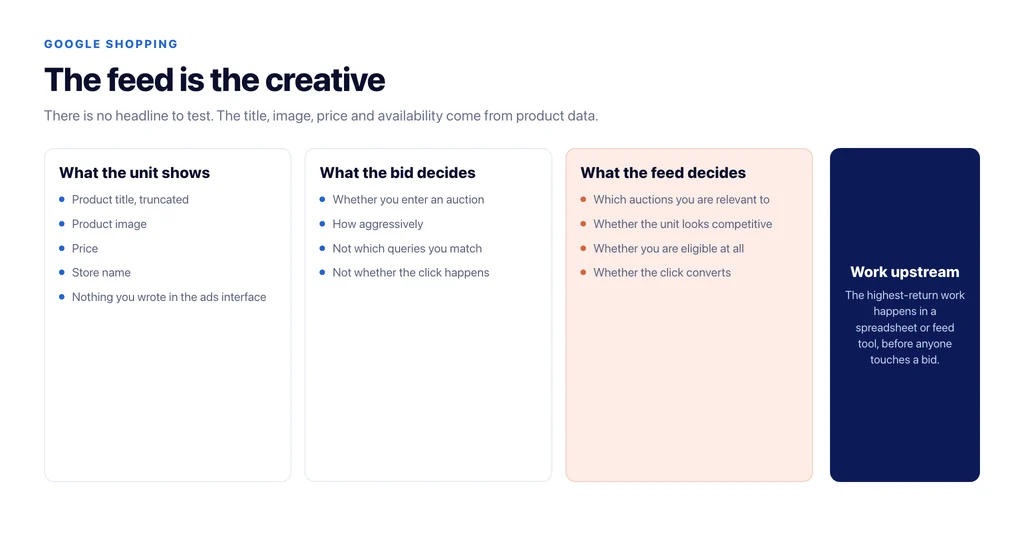
Shopping campaigns are the one paid channel where the creative is your product data. There is no headline to test and no landing page to rewrite in the ad — the title, the image, the price and the availability come from the feed, and they decide both what you show for and whether anyone clicks.
Which means most Shopping problems are feed problems being treated as bidding problems. Here is the order to work in.
Why the feed is the creative
A shopping unit shows a title, an image, a price and your store name. Every one of those comes from product data. A bid influences whether you enter an auction; the feed decides which auctions you are relevant to and whether you win the click once you are in one.
That has a practical consequence: the highest-return work is usually done before anyone touches a bid, and it is done in a spreadsheet or a feed tool rather than in the ads interface.
Titles carry more weight than anything else you control
Product titles determine which queries you match. A title copied from the manufacturer is optimised for a warehouse, not for search.
The pattern that works puts the attributes people search alongside the product name, front-loaded, because titles truncate: brand, product, the distinguishing attribute, then size or variant. For a shopper searching “waterproof hiking boots size 10 wide”, a title reading “Brand Model Waterproof Hiking Boots — Wide Fit — Size 10” matches; one reading “Model X GTX MW” does not.
Test this systematically rather than in bulk. Change titles for one category, watch impressions and click share for a fortnight, then apply the pattern that worked to the next category.
The attributes that gate eligibility
Missing or wrong attributes remove you from auctions you would have won, and the diagnostics are buried in Merchant Center rather than in the ads reporting.
The ones that matter in practice: `gtin` or `mpn` plus `brand`, because they connect the product to everything else known about it; `google_product_category` and `product_type`, because the first affects matching and the second is what you will use to structure campaigns; `availability` and `price`, which must match the landing page exactly; and the shipping and returns configuration, which affects whether your unit looks competitive next to identical products.
The image matters more than most stores expect. A white-background shot of the product alone outperforms a lifestyle image in this format, because the shopper is comparing objects, not moods.
Feed and page must agree, continuously
A price that moved on the site and not in the feed, or an item still shown available after it sold out, causes disapprovals and wasted spend. Both happen constantly on stores where the feed is generated on a schedule rather than on change.
For WooCommerce specifically, the default output omits `brand` and identifiers, and they need to exist at variation level, not only on the parent. That single gap accounts for a large share of “our products are not showing” cases.
Structure campaigns by margin, not by category
Once the data is right, the structural question is not how the catalogue is organised, it is which products you actually want to spend on.
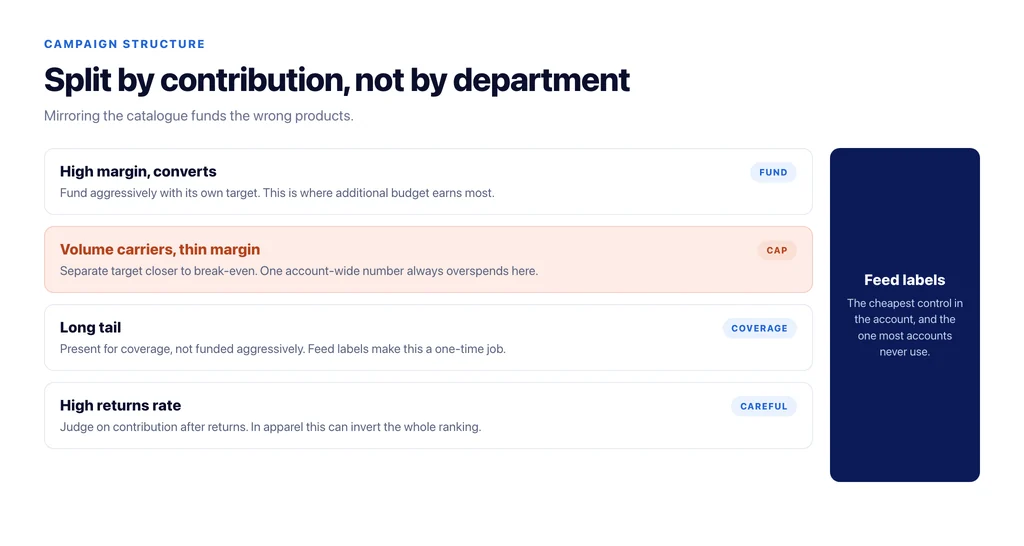
Split by contribution, not by department: high-margin products that convert, low-margin products that carry volume, and the long tail that should be there but not funded aggressively. Feed labels exist for exactly this and are the cheapest control in the account.
Then set targets per group. A single account-wide return target across products with different margins guarantees you overspend on the thin ones and underspend on the profitable ones.
Read the search terms, then act in the feed
The reflex when irrelevant queries appear is to add negatives. Often the better fix is upstream: the query matched because your title invited it.
Work both. Negatives handle the queries you never want; title and attribute changes handle the pattern that produced them. The second one compounds, the first one does not.
What Shopping cannot fix
If your product page loses to a marketplace listing on price, delivery and reviews, Shopping will buy you the click and lose you the sale. The channel amplifies the offer; it does not improve it.
That is where the organic and paid work meet. The product page substance that earns organic rankings — the facts the manufacturer feed does not contain — is also what converts the paid click, and the product page SEO checklist applies unchanged.
Where Shopping and organic product pages meet
The same product data drives both, which is why the two channels usually fail together and are usually fixed together.
An identifier missing from the feed is also missing from the page markup, so the product is harder to match in shopping surfaces and in AI commercial results at the same time. A price that disagrees between feed and page causes a disapproval in one channel and a trust problem in the other. A title written for a warehouse matches fewer paid queries and fewer organic ones.
The practical consequence is that the feed audit and the product template audit should be one job with one owner, not two projects in different teams. The store that runs them separately fixes the same problem twice and discovers the second half months later.
If you have to choose which to fix first, fix the data. It is the input to both channels, and unlike copy it fails silently.
The checklist
- Titles rewritten with searched attributes front-loaded, tested one category at a time.
- `gtin`/`mpn` and `brand` populated, at variation level.
- `google_product_category` and `product_type` set deliberately.
- Price and availability reconciled between feed and page continuously.
- Shipping and returns configured, because they show in the unit.
- Product-only images on a plain background.
- Feed labels for margin bands, with separate targets per band.
- Search terms reviewed weekly, with fixes made in the feed as well as in negatives.
- Landing pages carrying the substance that converts the click you paid for.
Sources
- What makes up a Shopping ad — Google Ads Help
- Title [title] and structured title — Google Merchant Center Help
- Product data specification — Google Merchant Center Help
- Merchant listing structured data — Google Search Central
Frequently Asked Questions
Want this run against your store? Book a call with The Reach Bureau.