
Technical SEO on an ecommerce site is not a checklist of two hundred items. It is four decisions that everything else depends on, and structured data is the one with the clearest rules and the widest gap between stores that get it right and stores that do not.
The reason it matters more here than on other site types is scale. A blog has fifty pages and a person who reviews them. A store has five thousand URLs generated by a template, filters that multiply them, and products that appear and disappear on their own. Every mistake is systematic, and every fix is a multiplier.
This is the working order: markup, crawl control, indexation, speed. Do them in that order and the rest of technical SEO becomes maintenance.
1. Structured data: what your listing is allowed to show
Structured data is not a ranking factor. It decides eligibility — whether your result can display price, availability and rating, or whether it appears as a plain blue link next to a competitor's rich one.
Per Google's Product structured data documentation, three constraints matter most:
- Only pages where a shopper can actually buy are eligible for merchant listing experiences. Pages linking out to other sellers do not qualify.
- Product rich results support pages focused on a single product or multiple variants of the same product — so a category page is not eligible, and marking one up as a product is a misuse.
- Put the markup in the initial HTML. Google's merchant listing guidance states that dynamically generated markup makes shopping crawls less frequent and less reliable — which matters most for the fields that change, price and availability.
That last point is the one that catches headless and JavaScript-heavy builds. Verify what the crawler receives, not what the browser renders.
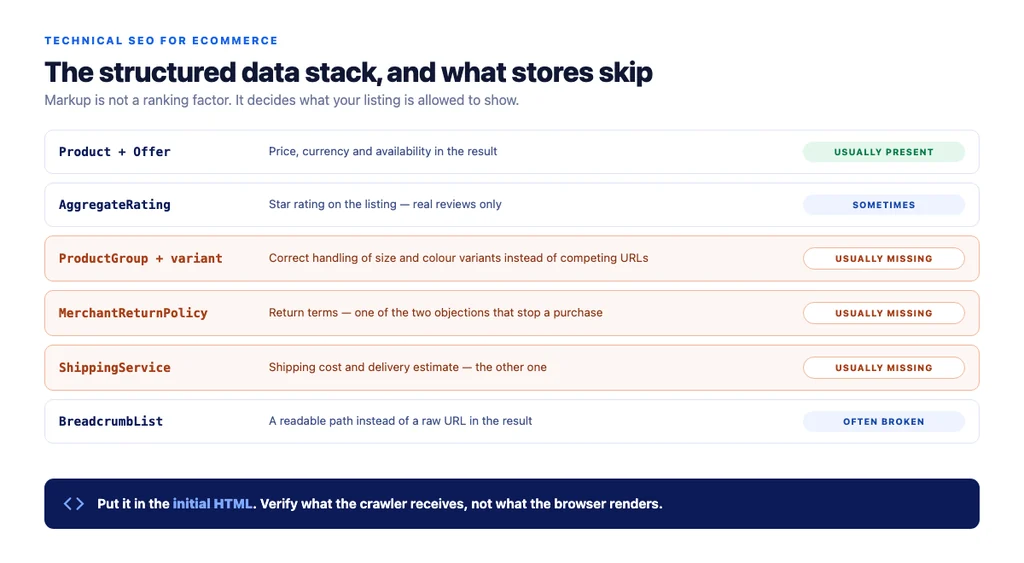
The stack worth implementing:
| Markup | What it enables | Commonly skipped? |
|---|---|---|
Product + Offer | Price, currency, availability | No — usually present |
AggregateRating / Review | Star ratings on the listing | Sometimes |
ProductGroup + variant | Correct handling of size and colour | Yes |
MerchantReturnPolicy | Return terms in shopping surfaces | Yes |
ShippingService | Shipping cost and delivery estimate | Yes |
BreadcrumbList | Path shown instead of a raw URL | Often broken |
Return and shipping markup are the most underused and the most valuable, because they answer the two objections that stop a purchase. Google documents both — return policy and shipping policy — as separate types.
On WooCommerce, most SEO plugins emit a basic Product block and nothing else. Check the output rather than trusting the checkbox.
2. Crawl control: filters, parameters and the URL explosion
A store with five filters can generate tens of thousands of URLs. Left alone they consume crawl budget, compete with each other, and bury the pages you care about.
The approach is deliberate selection, not blanket rules:
- Index the filtered views with real search demand — "waterproof", "wide fit". Give each a unique title and a line of unique copy. It is a subcategory in everything but name.
- Canonicalise everything else to the parent: colour, size, price band, sort order, and any multi-filter combination.
- Keep non-indexed combinations out of the sitemap — and, critically, out of navigation. If crawlers can reach them through links they will, whatever the canonical says.
- Paginated pages stay indexable and self-canonical. Canonicalising page 2 to page 1 hides everything past the first screen.
3. Indexation: what is in the index that should not be
Most stores have never audited this, and it is where the quick wins hide.
Common junk that ends up indexed: staging URLs, sample-page, auto-generated author and date archives, thank-you and cart pages, /collections/all-style catch-alls, and old campaign URLs nobody retired.
The check: compare your sitemap against what is actually indexed. Anything indexed that is not in the sitemap deserves a decision — index it deliberately, noindex it, or redirect it.
Out-of-stock and discontinued products belong in this section because deleting them is the most expensive routine mistake in ecommerce:
| Situation | Handling |
|---|---|
| Temporarily out of stock | Keep live and indexed, mark OutOfStock, offer alternatives |
| Discontinued, replacement exists | 301 to the replacement product |
| Discontinued, no replacement | 301 to the parent category, never the homepage |
| Seasonal | Keep live year-round; it accumulates authority between seasons |
4. Speed: where ecommerce sites lose it
Ecommerce pages are image-heavy and template-driven, so they fail Core Web Vitals in predictable ways.
- Never lazy-load the main product image or the first row of a category grid. That element is usually the Largest Contentful Paint, and lazy-loading it directly damages the metric it is measured by.
- Serve modern formats (WebP or AVIF) at correctly sized variants. A full-size hero scaled down in CSS wastes bandwidth on the connection least able to spare it.
- Set explicit image dimensions so the layout does not shift as images load.
- Watch the plugin tax. Every plugin adds queries and assets. On a page-generation profile, plugins are frequently a larger cost than the theme.
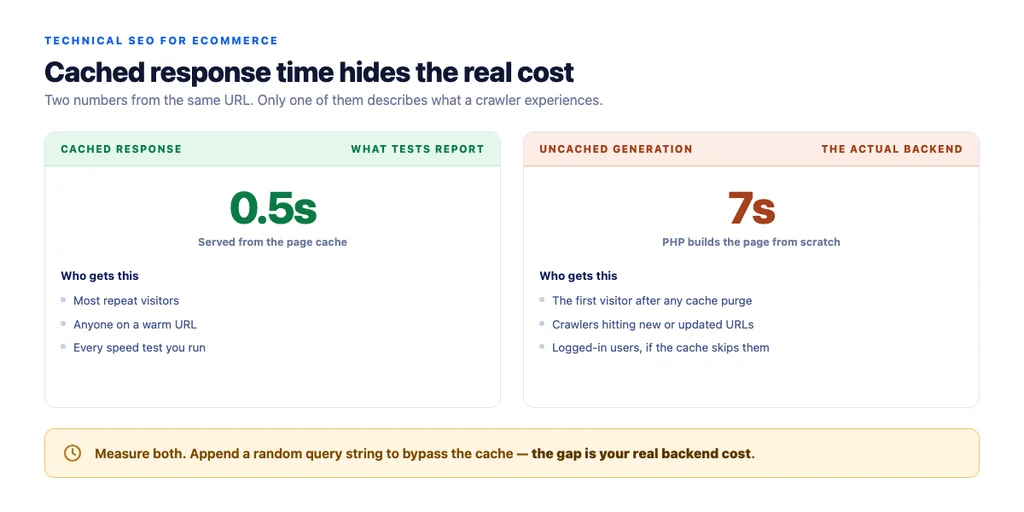
- Check uncached page generation, not just cached response time. Page caching hides a slow backend from most visitors, but not from the first visitor after a purge, and not from crawlers hitting new URLs.
The audit sequence
Run in this order. Each step makes the next one easier to interpret.
1. Fetch a product page as a crawler and confirm the structured data is in the returned HTML. 2. Validate the markup and note which of the six types are missing. 3. Compare sitemap against indexed URLs and list anything indexed that should not be. 4. Crawl the site and count URLs generated by filters and parameters. 5. Check the out-of-stock policy on a handful of discontinued products. 6. Measure cached and uncached response time separately on the same URL. 7. Run Core Web Vitals on a product page and a category page, on mobile.
The checklist
Product+Offermarkup present with price and availability- Markup in the initial HTML, verified as the crawler receives it
- Variant markup implemented where variants exist
- Return and shipping markup implemented
- Rating markup only where real reviews exist
BreadcrumbListpresent and valid- No product markup on category pages
- Demand-backed filtered views indexed with unique titles
- Colour, size, price and sort parameters canonicalised to the parent
- Non-indexed combinations absent from sitemap and navigation
- Paginated pages indexable and self-canonical
- Indexed-but-not-in-sitemap URLs reviewed and decided
- Out-of-stock and discontinued policy defined and applied
- Main product image and first grid row not lazy-loaded
- Modern image formats with explicit dimensions
- Uncached generation time measured, not just cached response
Sources
- Intro to Product Structured Data on Google — Google Search Central
- How To Add Merchant Listing Structured Data — Google Search Central
- Product Variant Structured Data (ProductGroup, Product) — Google Search Central
- Merchant Return Policy Structured Data — Google Search Central
- Merchant Shipping Policy Structured Data — Google Search Central
- SEO Best Practices for Ecommerce Sites — Google Search Central
Frequently Asked Questions
Want this run against your store? Book a call with The Reach Bureau.