We almost no-coded this site. The builder was faster, the templates looked fine, and the quote was a fraction of building it properly. Then our developer asked whether he could just code it, and the argument that followed is the one every founder eventually has.
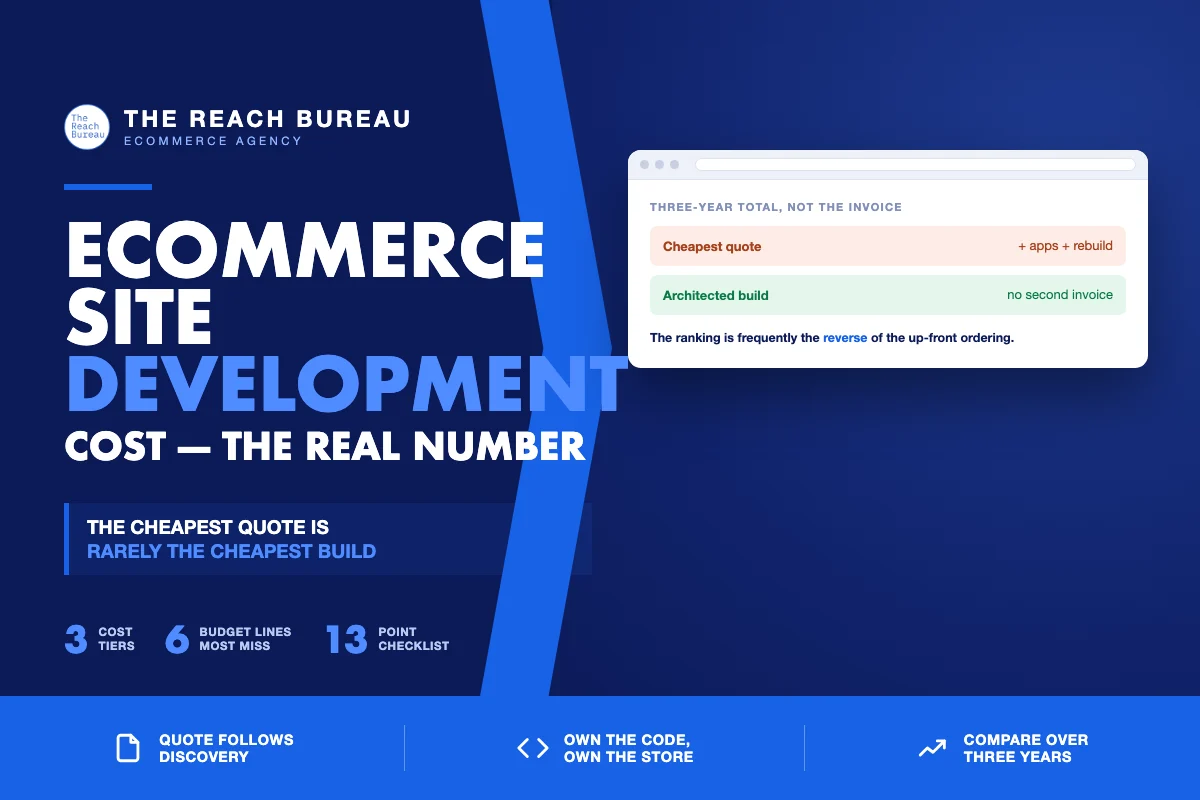
He won, and the reason is the thing this article is about: the cheapest quote is almost never the cheapest build. Not because cheap work is bad work, but because ecommerce site cost is spread across three years and only the first month appears on the invoice.
The three cost tiers, honestly
Numbers vary by market and complexity, so treat these as shapes rather than prices.
| Approach | Up-front | What you get | What you inherit |
|---|---|---|---|
| No-code / page builder | Lowest | Fast launch, visual editing, no developer needed | Platform lock-in, performance ceiling, limits you meet later |
| Commercial theme + configuration | Low | A real store, standard features, a familiar admin | Someone else's architecture; changes fight the theme |
| Custom build on a modern stack | Highest | Architecture you decided, no unused weight, changes that stay cheap | Responsibility for hosting and maintenance |
The tier that suits you depends less on budget than on one question: how many things must your store do that a standard checkout does not? If the answer is none, a theme is genuinely the right call and paying for custom work is waste. If you can list three, the theme will be the constraint you spend the next two years working around.
Where the money actually goes
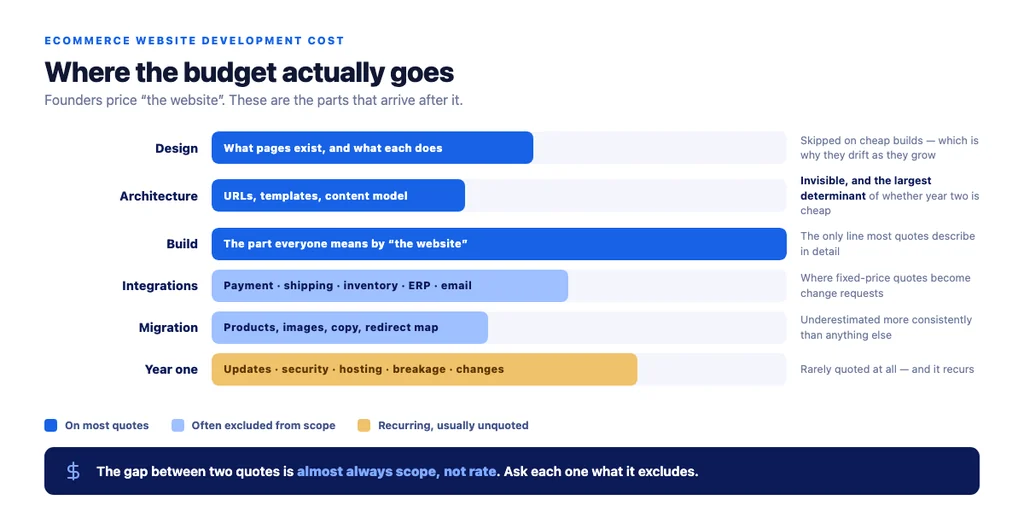
Founders usually price "the website" and are surprised by the rest of it. The realistic breakdown:
Design. Not the visual layer alone — the decisions about what pages exist and what each one does. Cheap builds skip this and design page by page, which is why they get inconsistent as they grow.
Architecture. URL structure, template types, the content model, how products relate to categories. Invisible, unglamorous, and the single largest determinant of whether SEO works and whether year two is cheap.
Build. The part everyone means by "the website."
Integrations. Payment, shipping, inventory, ERP, email. Each one is real work, and each is where fixed-price quotes quietly become change requests.
Content migration. Products, images, descriptions, and — if you are replatforming — the redirect map. Underestimated more consistently than anything else.
Testing and launch. Cross-browser, mobile, checkout under load, and a pre-launch crawl if URLs are changing.
Year one. Updates, security, hosting, breakage, and the changes you will want once real customers use it.
The no-code trap, specifically
No-code is not a bad tool. It is a bad tool for one particular situation: a store that will grow past what the builder anticipated.
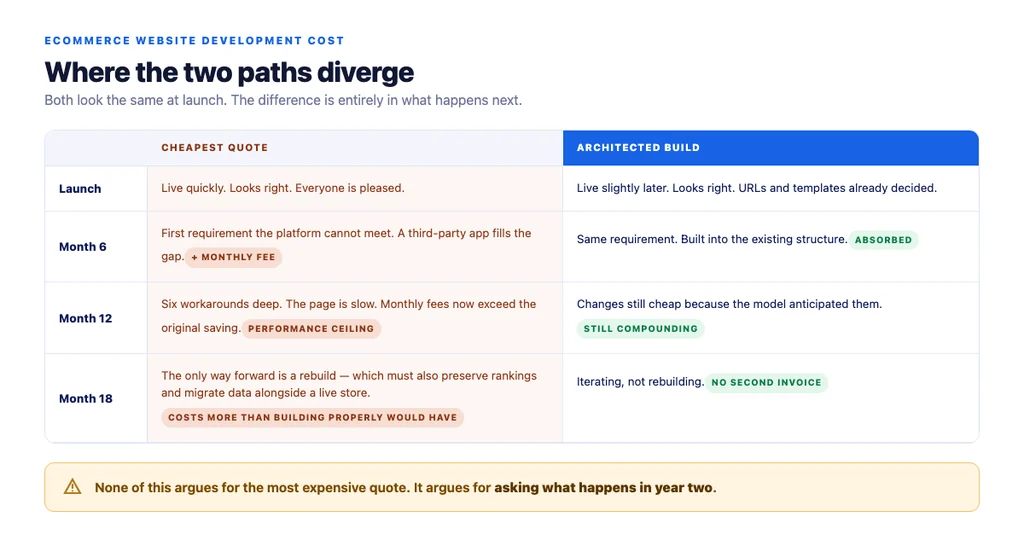
What actually happens is predictable. The build is quick and everyone is pleased. Then a requirement arrives that the platform does not support — a custom shipping rule, a product configurator, a feed for a marketplace — and there is no way in. The workaround is a third-party app with a monthly fee. Six workarounds later the page is slow, the monthly fees exceed the original saving, and the only path forward is a rebuild.
The rebuild costs more than the original build would have, because it also has to preserve rankings, migrate data, and run alongside a live store.
The honest version: no-code is right for validating whether a store should exist. It is wrong once you know it should.
The costs nobody quotes for
- Performance work. Ecommerce sites get slow in predictable ways. Building fast is cheap; retrofitting speed is not.
- SEO retrofit. URL structure and template markup are build decisions. Fixing them later means redirects, re-indexing, and a recovery period.
- The plugin tax. Every plugin is a licence, a security surface, and a compatibility risk. Twelve plugins is a monthly bill and an update burden.
- Rebuilding for the second market. Multi-currency, multi-language, and tax handling are architecture decisions, not features to add later.
- Your own time. The hours you spend managing a cheap vendor are the least visible and often the largest cost.
How to judge a quote
Insist the quote follow questions. Anyone who prices before understanding your catalogue, integrations, and traffic is guessing, and the guess is corrected later at your expense.
Ask what is excluded. The gap between quotes is usually scope, not rate. Migration, integrations and testing are the usual omissions.
Ask what year one costs. Updates, hosting, support, and what happens when something breaks outside business hours.
Ask who owns the code. It should be you, in a repository you can access. If it lives only on the production server, you are renting your own store.
Compare over three years. Up-front plus monthly fees plus the expected rebuild. The ranking is frequently the reverse of the up-front ordering.
What we did, and why
We built this site with code. The deciding argument was not craft or preference — it was that we could list several things the site had to do that a builder would not allow, and we knew we would be living with the result for years rather than months.
If you cannot list those things, buy the theme. That is a real recommendation, not false modesty. The waste in this industry runs in both directions, and paying for custom work you do not need is as expensive as buying a builder you will outgrow.
The cost checklist
- Listed the things your store must do that a standard checkout does not
- Quote produced after discovery, not before
- Scope exclusions written down: migration, integrations, testing
- Integration work itemised individually
- Content and product migration priced explicitly
- Redirect map included if URLs are changing
- Performance budget agreed at build time, not after
- URL structure and template types decided before design
- Plugin count justified, with licence costs totalled
- Multi-currency, language and tax needs raised up front
- Code ownership and repository access confirmed in writing
- Year-one costs quoted: hosting, updates, support, out-of-hours
- Total compared over three years, not at the invoice
Sources
- SEO Best Practices for Ecommerce Sites — Google Search Central
- Google Search Essentials — Google Search Central
- Creating Helpful, Reliable, People-First Content — Google Search Central
- Ecommerce Product Data and Content on Google — Google Search Central
- Intro to Product Structured Data on Google — Google Search Central
Frequently Asked Questions
Want this run against your store? Book a call with The Reach Bureau.